TypeScript教程

最后更新于:2026年3月11日 晚上

typeScript教程

前提知识:安装的有ndoejs*环境,javaScript基础知识或则java基础知识。*

1.进行全局安装:

安装typescript编译环境

pnpm i typescript -g

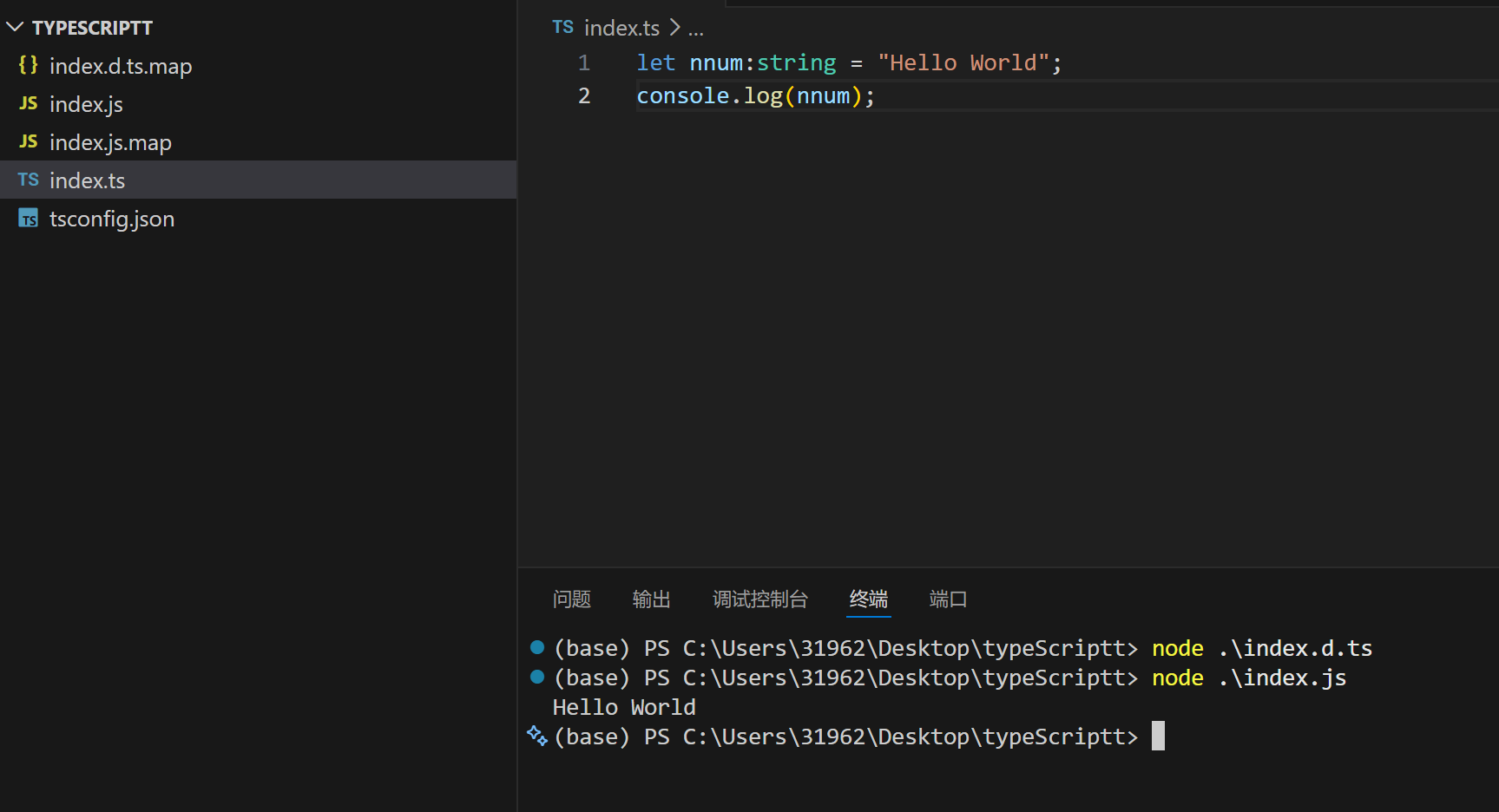
image-20260311185934135

使用tsc -w 将js文件编译成ts文件,最后node进行执行

二、基础类型

2.1 基本类型声明

1
2
3
4
5
6
7
8
9
10
11
12
13
14
15
16
17
18
19
20
21
22
23
24
25
26
27
28
29
30
31
32
33
34
35
36
37
38
39
40
41
42
43
44
45
46
47
48
49
50
51
52
// ============================================================
// 布尔类型(boolean)
// 只有两个值:true 和 false
// ============================================================
let isDone: boolean = false; // 任务是否完成
let isVisible: boolean = true; // 元素是否可见
let hasPermission: boolean = false; // 是否有权限

// ============================================================
// 数字类型(number)
// TypeScript 中所有数字都是浮点数,支持各种进制
// ============================================================
let age: number = 25; // 十进制整数
let price: number = 99.99; // 十进制小数
let hex: number = 0xff; // 十六进制(值为 255)
let binary: number = 0b1010; // 二进制(值为 10)
let octal: number = 0o744; // 八进制(值为 484)
let infinity: number = Infinity; // 无穷大
let notANumber: number = NaN; // 非数字

// ============================================================
// 大整数类型(bigint)
// 用于表示非常大的整数,数字后面加 n
// 注意:bigint 和 number 不能混合运算
// ============================================================
let bigNumber: bigint = 100n; // 大整数字面量
let anotherBig: bigint = BigInt(9007199254740991); // 用函数创建
// let mixed = bigNumber + 1; ❌ 错误!bigint 不能和 number 相加

// ============================================================
// 字符串类型(string)
// 可以用单引号、双引号、或反引号(模板字符串)
// ============================================================
let firstName: string = "Alice"; // 双引号
let lastName: string = 'Smith'; // 单引号
let greeting: string = `Hello, ${firstName}!`; // 模板字符串(推荐)
let multiLine: string = `
这是多行字符串
可以直接换行
非常方便
`;

// ============================================================
// Symbol 类型(symbol)
// 每个 Symbol 都是唯一的,常用作对象的属性键
// ============================================================
let sym1: symbol = Symbol("description"); // 创建一个唯一的 Symbol
let sym2: symbol = Symbol("description"); // 另一个唯一的 Symbol
console.log(sym1 === sym2); // false —— 即使描述相同,它们也不相等

// unique symbol —— 可以用作常量的类型
const uniqueSym: unique symbol = Symbol("unique");

2.2 特殊类型

TypeScript

1
2
3
4
5
6
7
8
9
10
11
12
13
14
15
16
17
18
19
20
21
22
23
24
25
26
27
28
29
30
31
32
33
34
35
36
37
38
39
40
41
42
43
44
45
46
47
48
49
50
51
52
53
54
55
56
57
58
59
60
61
62
63
64
65
66
67
68
69
70
71
72
73
74
75
76
77
78
79
80
81
82
83
84
85
86
87
88
89
90
91
92
93
94
95
96
97
98
99
100
101
102
103
104
105
106
107
108
109
// ============================================================
// null 和 undefined
// ============================================================

// undefined:表示变量已声明但未赋值
let u: undefined = undefined;

// null:表示故意设置的空值
let n: null = null;

// 实际使用中,通常与其他类型组成联合类型
let maybeName: string | null = null; // 名字可能为空
let maybeAge: number | undefined; // 年龄可能未定义

// 注意:开启 strictNullChecks 后(推荐),null 和 undefined
// 不能赋值给其他类型,必须显式声明联合类型
// let str: string = null; ❌ 严格模式下报错


// ============================================================
// void 类型
// 表示"没有类型",常用于函数没有返回值的情况
// ============================================================
function logMessage(message: string): void {
// 这个函数不返回任何值(或者说返回 undefined)
console.log(message);
// 注意:void 函数可以写 return; 但不能 return 一个值
}

// void 类型的变量只能赋值为 undefined
let noValue: void = undefined;
// let noValue2: void = null; ❌ 严格模式下报错


// ============================================================
// never 类型
// 表示"永远不会有值"的类型
// 用于:1. 永远不会正常结束的函数 2. 不可能存在的类型
// ============================================================

// 场景1:抛出错误的函数 —— 永远不会正常返回
function throwError(message: string): never {
throw new Error(message);
// 这行代码之后的内容永远不会执行
}

// 场景2:无限循环的函数 —— 永远不会结束
function infiniteLoop(): never {
while (true) {
// 永远在这里循环
}
}

// 场景3:穷尽检查(确保处理了所有情况)
type Color = "red" | "green" | "blue";

function getColorCode(color: Color): string {
switch (color) {
case "red":
return "#ff0000";
case "green":
return "#00ff00";
case "blue":
return "#0000ff";
default:
// 如果上面的 case 没有覆盖所有情况,这里会报错
// 因为 color 此时应该是 never 类型(不可能到达)
const exhaustiveCheck: never = color;
return exhaustiveCheck;
}
}


// ============================================================
// any 类型(尽量避免使用!)
// 关闭类型检查 —— 相当于回到了 JavaScript
// ============================================================
let anything: any = "hello";
anything = 42; // ✅ 可以赋值为数字
anything = true; // ✅ 可以赋值为布尔
anything = [1, 2, 3]; // ✅ 可以赋值为数组
anything.foo(); // ✅ 不会报错,但运行时可能出错!

// 什么时候用 any?
// - 迁移 JS 项目到 TS 时临时使用
// - 处理第三方库没有类型定义的情况
// - 真的无法确定类型时(但优先考虑 unknown)


// ============================================================
// unknown 类型(any 的安全替代品)
// 可以接受任何值,但使用前必须进行类型检查
// ============================================================
let mystery: unknown = "hello";
mystery = 42; // ✅ 可以赋值为任何类型
mystery = true; // ✅ 同上

// 但是不能直接使用!
// mystery.toUpperCase(); ❌ 错误!unknown 类型不能调用方法
// let str: string = mystery; ❌ 错误!不能赋值给其他类型

// 必须先进行类型检查(类型缩窄)
if (typeof mystery === "string") {
// 在这个 if 块里,TS 知道 mystery 是 string
console.log(mystery.toUpperCase()); // ✅ 安全!
}

// 或者用类型断言
let strValue: string = mystery as string; // ✅ 你告诉 TS "我知道这是 string"

2.3 数组

TypeScript

1
2
3
4
5
6
7
8
9
10
11
12
13
14
15
16
17
18
19
20
21
22
23
24
25
26
27
28
29
30
31
32
33
34
35
36
37
38
39
40
41
42
43
44
45
46
47
// ============================================================
// 数组类型 —— 存放相同类型元素的列表
// ============================================================

// 写法一:类型[](推荐,更简洁)
let numbers: number[] = [1, 2, 3, 4, 5];
let names: string[] = ["Alice", "Bob", "Charlie"];
let flags: boolean[] = [true, false, true];

// 写法二:Array<类型>(泛型写法)
let scores: Array<number> = [100, 95, 88];
let words: Array<string> = ["hello", "world"];

// 两种写法完全等价,选一种统一使用即可

// 数组的基本操作(类型安全)
numbers.push(6); // ✅ 添加 number
// numbers.push("hello"); ❌ 不能添加 string 到 number 数组

let first: number = numbers[0]; // 取出的元素是 number 类型

// 多维数组
let matrix: number[][] = [
[1, 2, 3],
[4, 5, 6],
[7, 8, 9]
];

// 联合类型数组 —— 数组中可以有多种类型
let mixed: (string | number)[] = [1, "hello", 2, "world"];

// 对象数组
let users: { name: string; age: number }[] = [
{ name: "Alice", age: 25 },
{ name: "Bob", age: 30 },
];

// ============================================================
// 只读数组 —— 创建后不能修改
// ============================================================
let readonlyNumbers: readonly number[] = [1, 2, 3];
// readonlyNumbers.push(4); ❌ 不能添加
// readonlyNumbers[0] = 10; ❌ 不能修改
// readonlyNumbers.pop(); ❌ 不能删除

// 另一种写法
let readonlyNames: ReadonlyArray<string> = ["Alice", "Bob"];

2.4 元组(Tuple)

TypeScript

1
2
3
4
5
6
7
8
9
10
11
12
13
14
15
16
17
18
19
20
21
22
23
24
25
26
27
28
29
30
31
32
33
34
35
36
37
38
39
40
41
42
43
44
// ============================================================
// 元组 —— 固定长度、固定类型的数组
// 与普通数组不同,每个位置的类型可以不同
// ============================================================

// 基本元组:第一个元素是 string,第二个是 number
let person: [string, number] = ["Alice", 25];

// 访问元素(TS 知道每个位置的具体类型)
let personName: string = person[0]; // TS 知道这是 string
let personAge: number = person[1]; // TS 知道这是 number
// let oops = person[2]; ❌ 元组只有 2 个元素,不能访问索引 2

// 解构元组
let [name, age] = person;
// name 的类型是 string,age 的类型是 number

// 命名元组(提高可读性,TS 4.0+)
let point: [x: number, y: number, z: number] = [10, 20, 30];

// 可选元组元素
let flexPoint: [number, number, number?] = [10, 20];
// 第三个元素可以省略

// 剩余元素的元组
let record: [string, ...number[]] = ["scores", 100, 95, 88, 92];
// 第一个是 string,后面可以有任意多个 number

// 只读元组
let readonlyTuple: readonly [string, number] = ["Alice", 25];
// readonlyTuple[0] = "Bob"; ❌ 不能修改

// 实际应用举例:函数返回多个值
function useState<T>(initial: T): [T, (newValue: T) => void] {
let value = initial;
function setValue(newValue: T) {
value = newValue;
}
return [value, setValue];
}

// 使用
const [count, setCount] = useState(0);
// count 是 number,setCount 是 (newValue: number) => void

2.5 枚举(Enum)

TypeScript

1
2
3
4
5
6
7
8
9
10
11
12
13
14
15
16
17
18
19
20
21
22
23
24
25
26
27
28
29
30
31
32
33
34
35
36
37
38
39
40
41
42
43
44
45
46
47
48
49
50
51
52
53
54
55
56
57
58
59
60
61
62
63
64
65
66
67
68
69
70
71
72
73
74
75
76
77
78
79
80
81
82
83
84
85
86
87
88
89
90
91
92
93
94
// ============================================================
// 枚举 —— 定义一组命名常量
// 让代码更具可读性,避免使用魔法数字/字符串
// ============================================================

// ---------- 数字枚举 ----------
// 默认从 0 开始自动递增
enum Direction {
Up, // 值为 0
Down, // 值为 1
Left, // 值为 2
Right // 值为 3
}

// 使用枚举
let playerDirection: Direction = Direction.Up;

// 可以通过值反向查找名称(数字枚举特有)
console.log(Direction[0]); // "Up"
console.log(Direction["Up"]); // 0

// 指定起始值
enum StatusCode {
OK = 200, // 200
Created = 201, // 201
BadRequest = 400, // 400
NotFound = 404, // 404
ServerError = 500 // 500
}

// 在条件判断中使用(比直接用数字更清晰)
function handleResponse(code: StatusCode) {
if (code === StatusCode.OK) {
console.log("请求成功");
} else if (code === StatusCode.NotFound) {
console.log("资源未找到");
}
}

handleResponse(StatusCode.OK); // "请求成功"


// ---------- 字符串枚举 ----------
// 每个成员都必须手动赋值为字符串
enum LogLevel {
Debug = "DEBUG",
Info = "INFO",
Warning = "WARNING",
Error = "ERROR"
}

function log(level: LogLevel, message: string) {
console.log(`[${level}] ${message}`);
}

log(LogLevel.Info, "应用已启动"); // "[INFO] 应用已启动"
log(LogLevel.Error, "发生了错误"); // "[ERROR] 发生了错误"


// ---------- 异构枚举(混合数字和字符串,不推荐)----------
enum Mixed {
No = 0,
Yes = "YES"
}


// ---------- const 枚举(性能优化)----------
// 编译时会被完全内联,不会生成额外的对象
const enum Fruit {
Apple, // 0
Banana, // 1
Cherry // 2
}

let myFruit = Fruit.Apple;
// 编译后直接变成:let myFruit = 0;
// 不会生成 Fruit 对象,减小了代码体积


// ---------- 枚举的替代方案:as const 对象 ----------
// 很多时候,用 as const 对象可以替代枚举
const COLORS = {
Red: "#ff0000",
Green: "#00ff00",
Blue: "#0000ff"
} as const;

// 提取值的联合类型
type ColorValue = typeof COLORS[keyof typeof COLORS];
// "#ff0000" | "#00ff00" | "#0000ff"

// 提取键的联合类型
type ColorName = keyof typeof COLORS;
// "Red" | "Green" | "Blue"

三、类型注解与类型推断

TypeScript

1
2
3
4
5
6
7
8
9
10
11
12
13
14
15
16
17
18
19
20
21
22
23
24
25
26
27
28
29
30
31
32
33
34
35
36
37
38
39
40
41
42
43
44
45
46
47
48
49
50
51
// ============================================================
// 类型注解(Type Annotation)
// 手动告诉 TypeScript 变量的类型
// 语法:变量名: 类型
// ============================================================
let explicitString: string = "Hello";
let explicitNumber: number = 42;
let explicitArray: string[] = ["a", "b", "c"];


// ============================================================
// 类型推断(Type Inference)
// TypeScript 自动推断变量的类型,不需要手动写
// ============================================================
let inferredString = "Hello"; // TS 自动推断为 string
let inferredNumber = 42; // TS 自动推断为 number
let inferredArray = ["a", "b"]; // TS 自动推断为 string[]
let inferredBoolean = true; // TS 自动推断为 boolean

// 推断后就不能赋值其他类型了
// inferredString = 123; ❌ 不能把 number 赋值给 string

// 建议:
// - 变量初始化时有值 → 让 TS 自动推断(更简洁)
// - 函数参数 → 手动写类型注解(更清晰)
// - 函数返回值 → 可以手动写也可以让 TS 推断


// ============================================================
// 字面量类型(Literal Types)
// 变量只能是某个具体的值
// ============================================================

// 字符串字面量类型
let direction: "up" | "down" | "left" | "right" = "up";
direction = "down"; // ✅
// direction = "diagonal"; ❌ 不在允许的值列表中

// 数字字面量类型
let diceRoll: 1 | 2 | 3 | 4 | 5 | 6 = 1;
diceRoll = 6; // ✅
// diceRoll = 7; ❌

// 布尔字面量类型
let alwaysTrue: true = true;
// alwaysTrue = false; ❌

// const 声明自动推断为字面量类型
const PI = 3.14159; // 类型是 3.14159(字面量),不是 number
const GREETING = "hello"; // 类型是 "hello"(字面量),不是 string
let variable = "hello"; // 类型是 string(因为 let 可以变)

四、函数

4.1 函数声明与类型

TypeScript

1
2
3
4
5
6
7
8
9
10
11
12
13
14
15
16
17
18
19
20
21
22
23
24
25
26
27
28
29
30
31
32
33
34
35
36
37
38
39
40
41
42
43
44
45
46
47
48
49
50
51
52
53
54
55
56
57
58
59
60
61
62
63
64
65
66
67
68
69
70
// ============================================================
// 函数声明(Function Declaration)
// ============================================================

// 参数和返回值都有类型注解
function add(a: number, b: number): number {
return a + b;
}

// 调用
let result = add(1, 2); // result 的类型自动推断为 number
// add("1", "2"); ❌ 参数类型不对


// ============================================================
// 箭头函数(Arrow Function)
// ============================================================
const multiply = (a: number, b: number): number => {
return a * b;
};

// 简写(只有一个表达式时可以省略花括号和 return)
const divide = (a: number, b: number): number => a / b;


// ============================================================
// 函数类型表达式
// 描述函数的"形状"(参数类型和返回类型)
// ============================================================

// 定义一个变量,它的类型是"接受两个 number 参数并返回 number 的函数"
let mathOperation: (a: number, b: number) => number;

// 赋值为符合此类型的函数
mathOperation = (x, y) => x + y; // ✅ 参数名不需要一致
mathOperation = (x, y) => x * y; // ✅ 只要参数类型和返回类型匹配
// mathOperation = (x) => x; ❌ 参数数量不对

// 注意函数类型中的 => 和箭头函数的 => 不同!
// (a: number, b: number) => number 这是【类型声明】
// (a, b) => a + b 这是【函数实现】


// ============================================================
// 函数类型别名(更清晰的写法)
// ============================================================
type MathFunc = (a: number, b: number) => number;

const subtract: MathFunc = (a, b) => a - b;
const power: MathFunc = (a, b) => a ** b;

// 作为参数传递
function calculate(operation: MathFunc, x: number, y: number): number {
return operation(x, y);
}

calculate(add, 10, 5); // 15
calculate(subtract, 10, 5); // 5
calculate(multiply, 10, 5); // 50


// ============================================================
// 使用接口定义函数类型(另一种方式)
// ============================================================
interface StringProcessor {
(input: string): string; // 调用签名
}

const toUpperCase: StringProcessor = (str) => str.toUpperCase();
const trim: StringProcessor = (str) => str.trim();

4.2 可选参数、默认参数、剩余参数

TypeScript

1
2
3
4
5
6
7
8
9
10
11
12
13
14
15
16
17
18
19
20
21
22
23
24
25
26
27
28
29
30
31
32
33
34
35
36
37
38
39
40
41
42
43
44
45
46
47
48
49
50
51
52
53
54
55
56
57
58
59
60
61
62
63
64
65
66
67
68
69
70
71
72
73
74
75
76
77
78
79
80
81
// ============================================================
// 可选参数(Optional Parameters)
// 在参数名后加 ? 表示该参数可以不传
// 可选参数必须放在必需参数后面!
// ============================================================
function greet(name: string, greeting?: string): string {
// greeting 的类型是 string | undefined
if (greeting) {
return `${greeting}, ${name}!`;
}
return `Hello, ${name}!`;
}

greet("Alice"); // "Hello, Alice!" —— 不传 greeting
greet("Alice", "Hi"); // "Hi, Alice!" —— 传了 greeting
// greet(); ❌ name 是必需的


// ============================================================
// 默认参数(Default Parameters)
// 给参数设置默认值,不传时使用默认值
// 有默认值的参数自动变为可选的
// ============================================================
function createUser(
name: string, // 必需参数
role: string = "user", // 默认值为 "user"
isActive: boolean = true // 默认值为 true
) {
return { name, role, isActive };
}

createUser("Alice"); // { name: "Alice", role: "user", isActive: true }
createUser("Bob", "admin"); // { name: "Bob", role: "admin", isActive: true }
createUser("Charlie", "editor", false); // { name: "Charlie", role: "editor", isActive: false }


// ============================================================
// 剩余参数(Rest Parameters)
// 用 ...参数名 收集任意数量的参数到数组中
// 剩余参数必须是最后一个参数
// ============================================================
function sum(...numbers: number[]): number {
// numbers 是一个 number 数组,包含所有传入的参数
return numbers.reduce((total, num) => total + num, 0);
}

sum(1, 2, 3); // 6
sum(10, 20, 30, 40); // 100
sum(); // 0(空数组,reduce 初始值为 0)

// 必需参数 + 剩余参数 组合使用
function logMessages(level: string, ...messages: string[]): void {
messages.forEach(msg => {
console.log(`[${level}] ${msg}`);
});
}

logMessages("INFO", "服务器启动", "监听端口 3000");
// [INFO] 服务器启动
// [INFO] 监听端口 3000


// ============================================================
// 参数解构(Destructuring Parameters)
// ============================================================
interface Config {
host: string;
port: number;
protocol?: string;
}

// 解构对象参数并指定类型
function connect({ host, port, protocol = "https" }: Config): string {
return `${protocol}://${host}:${port}`;
}

connect({ host: "localhost", port: 3000 });
// "https://localhost:3000"

connect({ host: "example.com", port: 443, protocol: "http" });
// "http://example.com:443"

4.3 函数重载(Function Overloading)

TypeScript

1
2
3
4
5
6
7
8
9
10
11
12
13
14
15
16
17
18
19
20
21
22
23
24
25
26
27
28
29
30
31
32
33
34
35
36
37
38
39
40
41
42
43
44
45
46
47
48
49
50
51
52
53
54
55
56
57
58
59
60
61
62
63
64
65
66
67
68
69
70
71
72
73
74
// ============================================================
// 函数重载
// 同一个函数名,根据不同的参数类型/数量,有不同的行为
//
// 结构:
// 1. 重载签名(可以有多个)—— 描述可以怎样调用
// 2. 实现签名(只有一个)—— 真正的实现
// ============================================================

// 重载签名1:传入 string,返回 string
function format(value: string): string;

// 重载签名2:传入 number,返回 string
function format(value: number): string;

// 重载签名3:传入 Date,返回 string
function format(value: Date): string;

// 实现签名(不直接对外暴露,必须兼容所有重载签名)
function format(value: string | number | Date): string {
if (typeof value === "string") {
return value.trim().toUpperCase();
} else if (typeof value === "number") {
return value.toFixed(2);
} else {
return value.toISOString();
}
}

// 调用(TS 根据参数类型匹配对应的重载签名)
let r1 = format(" hello "); // ✅ 匹配签名1,返回 string
let r2 = format(3.14159); // ✅ 匹配签名2,返回 string
let r3 = format(new Date()); // ✅ 匹配签名3,返回 string
// let r4 = format(true); ❌ 没有匹配 boolean 的重载签名


// ---------- 更实际的例子:根据参数数量重载 ----------

function createElement(tag: string): HTMLElement;
function createElement(tag: string, content: string): HTMLElement;
function createElement(tag: string, content?: string): HTMLElement {
const el = document.createElement(tag);
if (content) {
el.textContent = content;
}
return el;
}

createElement("div"); // ✅ 创建空 div
createElement("p", "Hello World"); // ✅ 创建带内容的 p


// ---------- 函数重载 vs 联合类型 ----------
// 如果参数和返回值之间没有对应关系,用联合类型更简单
// 如果需要"传入 A 返回 X,传入 B 返回 Y",用重载

// 简单情况 → 用联合类型
function formatSimple(value: string | number): string {
return String(value);
}

// 复杂情况(返回类型取决于输入类型)→ 用重载
function parse(input: string): number;
function parse(input: number): string;
function parse(input: string | number): number | string {
if (typeof input === "string") {
return parseInt(input, 10); // string → number
} else {
return input.toString(); // number → string
}
}

let num = parse("42"); // 类型是 number
let str = parse(42); // 类型是 string

4.4 this 类型

TypeScript

1
2
3
4
5
6
7
8
9
10
11
12
13
14
15
16
17
18
19
20
// ============================================================
// 在 TypeScript 中声明 this 的类型
// ============================================================
interface User {
name: string;
greet(this: User): string; // 声明 this 必须是 User 类型
}

const user: User = {
name: "Alice",
greet() {
// 这里的 this 被 TS 识别为 User 类型
return `Hello, I'm ${this.name}`;
}
};

user.greet(); // ✅ this 是 user 对象

// const greetFn = user.greet;
// greetFn(); ❌ this 上下文不是 User

五、接口(Interface)

5.1 基本接口

TypeScript

1
2
3
4
5
6
7
8
9
10
11
12
13
14
15
16
17
18
19
20
21
22
23
24
25
26
27
28
29
30
31
32
33
34
35
36
37
38
39
40
41
42
43
44
45
46
47
48
49
// ============================================================
// 接口 —— 定义对象的"形状"(有哪些属性,每个属性是什么类型)
// 接口只用于类型检查,编译后不存在于 JS 代码中
// ============================================================

interface User {
// 必需属性 —— 创建对象时必须提供
id: number;
name: string;
email: string;

// 可选属性 —— 用 ? 标记,可以不提供
phone?: string;
avatar?: string;

// 只读属性 —— 创建后不能修改
readonly createdAt: Date;
readonly role: string;
}

// 创建符合接口的对象
const alice: User = {
id: 1,
name: "Alice",
email: "alice@example.com",
// phone 和 avatar 是可选的,可以不写
createdAt: new Date(),
role: "admin"
};

// alice.name = "Bob"; ✅ 可以修改普通属性
// alice.createdAt = new Date(); ❌ 不能修改只读属性

// 缺少必需属性会报错
// const bob: User = {
// id: 2,
// name: "Bob"
// // ❌ 缺少 email, createdAt, role
// };

// 多出属性也会报错(多余属性检查)
// const charlie: User = {
// id: 3,
// name: "Charlie",
// email: "charlie@example.com",
// createdAt: new Date(),
// role: "user",
// age: 25 // ❌ User 接口中没有 age 属性
// };

5.2 索引签名

TypeScript

1
2
3
4
5
6
7
8
9
10
11
12
13
14
15
16
17
18
19
20
21
22
23
24
25
26
27
28
29
30
31
32
33
34
35
36
37
38
39
// ============================================================
// 索引签名 —— 允许对象有动态的属性名
// ============================================================

// 字符串索引签名:任意字符串键 → string 值
interface StringDictionary {
[key: string]: string;
}

const translations: StringDictionary = {
hello: "你好",
world: "世界",
goodbye: "再见"
// 可以添加任意多的键值对,只要值是 string
};

// 数字索引签名
interface NumberArray {
[index: number]: string;
}

const arr: NumberArray = ["a", "b", "c"];
// arr[0] 的类型是 string

// 混合:固定属性 + 索引签名
interface UserProfile {
name: string; // 固定属性
age: number; // 固定属性
[key: string]: string | number; // 索引签名
// 注意:固定属性的类型必须是索引签名值类型的子集
}

const profile: UserProfile = {
name: "Alice",
age: 25,
city: "Beijing", // ✅ string 类型
score: 100, // ✅ number 类型
// active: true ❌ boolean 不在 string | number 中
};

5.3 接口继承

TypeScript

1
2
3
4
5
6
7
8
9
10
11
12
13
14
15
16
17
18
19
20
21
22
23
24
25
26
27
28
29
30
31
32
33
34
35
36
37
38
39
40
41
42
43
44
45
46
47
48
49
50
51
52
53
54
55
56
57
58
59
60
61
62
63
64
65
66
67
68
69
70
71
72
73
74
75
76
77
78
79
// ============================================================
// 接口继承 —— 用 extends 关键字
// 子接口拥有父接口的所有属性,还可以添加新属性
// ============================================================

// 基础接口
interface Animal {
name: string;
age: number;
}

// 继承 Animal,添加新属性
interface Dog extends Animal {
breed: string; // 狗的品种
bark(): void; // 狗会叫
}

// Dog 包含 name, age, breed, bark 四个成员
const myDog: Dog = {
name: "Buddy",
age: 3,
breed: "Labrador",
bark() {
console.log("Woof! Woof!");
}
};

// ---------- 多继承(一个接口继承多个接口) ----------
interface Printable {
print(): void;
}

interface Serializable {
serialize(): string;
}

interface Loggable {
log(message: string): void;
}

// Document 继承了三个接口的所有成员
interface Document extends Printable, Serializable, Loggable {
title: string;
content: string;
}

const doc: Document = {
title: "My Document",
content: "Hello World",
print() { console.log(this.content); },
serialize() { return JSON.stringify({ title: this.title, content: this.content }); },
log(msg) { console.log(`[Document] ${msg}`); }
};


// ---------- 接口声明合并(Declaration Merging) ----------
// 同名的接口会自动合并 —— 这是 interface 独有的特性

interface Config {
host: string;
port: number;
}

// 再次声明同名接口,会自动与上面的合并
interface Config {
protocol: string;
timeout: number;
}

// 合并后的 Config 包含所有 4 个属性
const config: Config = {
host: "localhost",
port: 3000,
protocol: "https",
timeout: 5000
};

// 这个特性在扩展第三方库的类型定义时非常有用
// 比如给 Window 对象添加自定义属性

5.4 接口描述函数类型

TypeScript

1
2
3
4
5
6
7
8
9
10
11
12
13
14
15
16
17
18
19
20
21
22
23
24
25
26
27
28
29
30
31
32
33
34
35
36
37
38
39
40
41
42
43
44
45
46
47
48
49
50
// ============================================================
// 接口可以描述函数的类型(调用签名)
// ============================================================

interface SearchFunction {
// 调用签名:(参数列表): 返回类型
(source: string, subString: string): boolean;
}

const mySearch: SearchFunction = (source, sub) => {
return source.includes(sub);
};

mySearch("Hello World", "World"); // true


// ---------- 带属性的函数(混合类型) ----------
// 函数也是对象,可以有属性

interface Counter {
// 调用签名
(start: number): number;

// 属性
count: number;
reset(): void;
}

function createCounter(): Counter {
// 先创建函数
const counter = function(start: number) {
counter.count += start;
return counter.count;
} as Counter;

// 添加属性
counter.count = 0;
counter.reset = function() {
this.count = 0;
};

return counter;
}

const myCounter = createCounter();
myCounter(5); // count = 5
myCounter(10); // count = 15
console.log(myCounter.count); // 15
myCounter.reset();
console.log(myCounter.count); // 0

六、类型别名(Type Alias)

TypeScript

1
2
3
4
5
6
7
8
9
10
11
12
13
14
15
16
17
18
19
20
21
22
23
24
25
26
27
28
29
30
31
32
33
34
35
36
37
38
39
40
41
42
43
44
45
46
47
48
49
50
51
52
53
54
55
56
57
58
59
60
61
62
63
64
65
66
67
68
69
70
71
72
73
74
75
76
77
78
79
80
81
82
83
84
85
86
87
88
89
90
91
92
93
94
95
// ============================================================
// type 关键字 —— 给类型起一个新名字
// 可以定义任何类型,比 interface 更灵活
// ============================================================

// ---------- 基本类型别名 ----------
type ID = number; // ID 就是 number 的别名
type Username = string; // Username 就是 string
type Nullable<T> = T | null; // 泛型类型别名
type MaybeString = Nullable<string>; // string | null

// 使用
let userId: ID = 123;
let userName: Username = "Alice";
let nickName: MaybeString = null;


// ---------- 对象类型别名 ----------
type Point = {
x: number;
y: number;
};

type User = {
readonly id: number; // 只读
name: string;
email?: string; // 可选
};

const origin: Point = { x: 0, y: 0 };


// ---------- 函数类型别名 ----------
type Callback = (error: Error | null, data: string) => void;
type AsyncFunction = () => Promise<void>;
type Comparator<T> = (a: T, b: T) => number;

const numberCompare: Comparator<number> = (a, b) => a - b;


// ---------- 联合类型别名 ----------
type Status = "active" | "inactive" | "pending";
type Response = Success | Failure; // 使用前需定义 Success 和 Failure

type Success = {
status: "success";
data: any;
};

type Failure = {
status: "failure";
error: string;
};


// ---------- 交叉类型别名 ----------
type HasName = { name: string };
type HasAge = { age: number };
type HasEmail = { email: string };

// Person 必须同时拥有 name、age、email
type Person = HasName & HasAge & HasEmail;

const person: Person = {
name: "Alice",
age: 25,
email: "alice@example.com"
};


// ============================================================
// Interface vs Type —— 什么时候用哪个?
// ============================================================

/*
* 推荐原则:
*
*interface 的情况:
* ✅ 定义对象结构(最常见)
* ✅ 需要声明合并(扩展第三方类型)
* ✅ 类实现(class implements)
* ✅ 需要 extends 继承
*
*type 的情况:
* ✅ 联合类型(type A = B | C)
* ✅ 交叉类型(type A = B & C)
* ✅ 元组类型(type Pair = [string, number])
* ✅ 映射类型、条件类型等高级类型
* ✅ 基本类型别名(type ID = number)
* ✅ 函数类型
*
* 简单记忆:
* 定义对象 → 优先用 interface
* 其他情况 → 用 type
*/

七、联合类型与交叉类型

7.1 联合类型(Union Types)

TypeScript

1
2
3
4
5
6
7
8
9
10
11
12
13
14
15
16
17
18
19
20
21
22
23
24
25
26
27
28
29
30
31
32
33
34
35
36
37
38
39
40
41
42
43
44
45
46
47
48
49
50
51
52
53
54
55
56
57
58
59
60
61
62
63
64
65
66
67
68
69
70
71
72
73
74
75
76
77
78
79
80
81
82
83
84
85
86
87
88
89
90
91
92
93
94
95
96
97
98
99
100
101
102
103
104
105
106
107
108
109
110
111
112
113
114
115
116
117
118
119
120
121
122
123
// ============================================================
// 联合类型 —— 用 | 连接多个类型,表示"其中之一"
// 读作"A 或 B 或 C"
// ============================================================

// 基本联合类型
let id: string | number;
id = "abc"; // ✅ 可以是 string
id = 123; // ✅ 也可以是 number
// id = true; ❌ 不能是 boolean

// 联合类型在函数参数中的使用
function formatId(id: string | number): string {
// 问题:id 可能是 string 也可能是 number
// 不能直接调用 string 或 number 独有的方法
// id.toUpperCase(); ❌ number 没有 toUpperCase
// id.toFixed(2); ❌ string 没有 toFixed

// 解决方案:类型缩窄(Type Narrowing)
if (typeof id === "string") {
// 在这个分支里,TS 知道 id 是 string
return id.toUpperCase();
} else {
// 在这个分支里,TS 知道 id 是 number
return id.toString();
}
}


// ============================================================
// 可辨识联合(Discriminated Union)
// 每个成员都有一个共同的属性(判别属性),用来区分是哪个类型
// 这是 TypeScript 中最强大的模式之一!
// ============================================================

// 定义形状类型,每个都有 kind 属性作为判别标记
interface Circle {
kind: "circle"; // 字面量类型作为判别标记
radius: number;
}

interface Rectangle {
kind: "rectangle";
width: number;
height: number;
}

interface Triangle {
kind: "triangle";
base: number;
height: number;
}

// 联合类型
type Shape = Circle | Rectangle | Triangle;

// 根据 kind 判断具体是哪种形状
function getArea(shape: Shape): number {
switch (shape.kind) {
case "circle":
// TS 知道这里 shape 是 Circle
return Math.PI * shape.radius ** 2;

case "rectangle":
// TS 知道这里 shape 是 Rectangle
return shape.width * shape.height;

case "triangle":
// TS 知道这里 shape 是 Triangle
return 0.5 * shape.base * shape.height;

default:
// 穷尽检查:如果漏掉了某个 case,这里会报错
const _exhaustive: never = shape;
return _exhaustive;
}
}

// 使用
const circle: Shape = { kind: "circle", radius: 5 };
const rect: Shape = { kind: "rectangle", width: 10, height: 20 };
const tri: Shape = { kind: "triangle", base: 6, height: 8 };

console.log(getArea(circle)); // 78.539...
console.log(getArea(rect)); // 200
console.log(getArea(tri)); // 24


// ---------- 更实际的例子:API 响应处理 ----------
interface SuccessResponse<T> {
status: "success";
data: T;
timestamp: number;
}

interface ErrorResponse {
status: "error";
message: string;
code: number;
}

interface LoadingState {
status: "loading";
}

type ApiState<T> = SuccessResponse<T> | ErrorResponse | LoadingState;

function handleApiState<T>(state: ApiState<T>): void {
switch (state.status) {
case "loading":
console.log("加载中...");
break;

case "success":
console.log("数据:", state.data); // TS 知道有 data 属性
console.log("时间:", state.timestamp); // TS 知道有 timestamp 属性
break;

case "error":
console.error(`错误 ${state.code}: ${state.message}`); // TS 知道有 code 和 message
break;
}
}

7.2 交叉类型(Intersection Types)

TypeScript

1
2
3
4
5
6
7
8
9
10
11
12
13
14
15
16
17
18
19
20
21
22
23
24
25
26
27
28
29
30
31
32
33
34
35
36
37
38
39
40
41
42
43
44
45
46
47
48
49
50
51
52
53
54
55
56
57
58
59
60
61
62
63
64
65
66
67
68
69
// ============================================================
// 交叉类型 —— 用 & 连接多个类型,表示"同时满足所有"
// 读作"A 且 B 且 C"
// 结果类型拥有所有类型的属性
// ============================================================

type HasId = {
id: number;
};

type HasName = {
name: string;
};

type HasEmail = {
email: string;
};

type HasTimestamps = {
createdAt: Date;
updatedAt: Date;
};

// 交叉类型:User 必须同时拥有所有属性
type User = HasId & HasName & HasEmail & HasTimestamps;

const user: User = {
id: 1,
name: "Alice",
email: "alice@example.com",
createdAt: new Date(),
updatedAt: new Date()
};
// 缺少任何一个属性都会报错


// ---------- 交叉类型 vs 接口继承 ----------

// 用接口继承实现同样的效果:
interface BaseEntity {
id: number;
createdAt: Date;
}

interface UserInfo {
name: string;
email: string;
}

// 方式1:接口继承
interface UserV1 extends BaseEntity, UserInfo {
role: string;
}

// 方式2:交叉类型
type UserV2 = BaseEntity & UserInfo & {
role: string;
};

// 两者效果基本相同

// ---------- 交叉类型的冲突处理 ----------
type A = { value: string };
type B = { value: number };
type C = A & B;

// C 的 value 属性类型是 string & number = never
// 因为一个值不可能同时是 string 和 number
// 所以 C 实际上是不可用的类型

八、类型缩窄(Type Narrowing)

TypeScript

1
2
3
4
5
6
7
8
9
10
11
12
13
14
15
16
17
18
19
20
21
22
23
24
25
26
27
28
29
30
31
32
33
34
35
36
37
38
39
40
41
42
43
44
45
46
47
48
49
50
51
52
53
54
55
56
57
58
59
60
61
62
63
64
65
66
67
68
69
70
71
72
73
74
75
76
77
78
79
80
81
82
83
84
85
86
87
88
89
90
91
92
93
94
95
96
97
98
99
100
101
102
103
104
105
106
107
108
109
110
111
112
113
114
115
116
117
118
119
120
121
122
123
124
125
126
127
128
129
130
131
132
133
134
135
136
137
138
139
140
141
142
143
144
145
146
147
148
149
150
151
152
153
154
155
156
157
158
159
160
161
162
163
164
165
166
167
168
169
170
171
172
173
174
175
176
177
178
// ============================================================
// 类型缩窄 —— 在代码中通过条件判断,让 TS 识别出更具体的类型
// 这是使用联合类型时最重要的技术!
// ============================================================

// ---------- 1. typeof 类型守卫 ----------
function processValue(value: string | number | boolean) {
// 在 if 之前,value 是 string | number | boolean

if (typeof value === "string") {
// 在这里,TS 知道 value 是 string
console.log(value.toUpperCase()); // ✅
console.log(value.length); // ✅
} else if (typeof value === "number") {
// 在这里,TS 知道 value 是 number
console.log(value.toFixed(2)); // ✅
console.log(Math.round(value)); // ✅
} else {
// 在这里,TS 知道 value 是 boolean
console.log(value ? "真" : "假"); // ✅
}
}


// ---------- 2. 真值/假值检查(Truthiness) ----------
function printName(name: string | null | undefined) {
// 检查 name 不为 null/undefined/空字符串
if (name) {
// 在这里,TS 知道 name 是 string(排除了 null、undefined 和 "")
console.log(name.toUpperCase());
} else {
console.log("名字为空");
}
}


// ---------- 3. 相等性检查 ----------
function compare(a: string | number, b: string | boolean) {
if (a === b) {
// a 和 b 都是 string | number 和 string | boolean 的交集
// 所以在这里,a 和 b 都是 string
console.log(a.toUpperCase()); // ✅
console.log(b.toUpperCase()); // ✅
}
}

function handleStatus(status: "success" | "error" | "loading") {
if (status === "success") {
// 在这里,status 是 "success"
console.log("成功!");
}
// ...
}


// ---------- 4. in 操作符 ----------
interface Fish {
swim(): void;
name: string;
}

interface Bird {
fly(): void;
name: string;
}

function move(animal: Fish | Bird) {
// 检查对象中是否有某个属性
if ("swim" in animal) {
// 在这里,TS 知道 animal 是 Fish
animal.swim();
} else {
// 在这里,TS 知道 animal 是 Bird
animal.fly();
}
}


// ---------- 5. instanceof 操作符 ----------
function formatDate(date: Date | string): string {
if (date instanceof Date) {
// 在这里,TS 知道 date 是 Date 实例
return date.toLocaleDateString();
} else {
// 在这里,TS 知道 date 是 string
return new Date(date).toLocaleDateString();
}
}

class CustomError extends Error {
code: number;
constructor(message: string, code: number) {
super(message);
this.code = code;
}
}

function handleError(error: Error | CustomError) {
if (error instanceof CustomError) {
// 在这里,TS 知道 error 是 CustomError
console.log(`错误码: ${error.code}`); // ✅ 可以访问 code
} else {
// 在这里,TS 知道 error 只是普通 Error
console.log(`错误: ${error.message}`);
}
}


// ---------- 6. 自定义类型守卫(Type Predicate) ----------
// 当内置的类型检查不够用时,可以自定义判断函数
// 返回类型写 "参数 is 类型"

interface Cat {
meow(): void;
purr(): void;
}

interface Dog {
bark(): void;
fetch(): void;
}

// 自定义类型守卫函数
// 返回类型 "pet is Cat" 告诉 TS:如果此函数返回 true,则 pet 是 Cat
function isCat(pet: Cat | Dog): pet is Cat {
// 通过检查特定方法来判断
return (pet as Cat).meow !== undefined;
}

function isDog(pet: Cat | Dog): pet is Dog {
return (pet as Dog).bark !== undefined;
}

function handlePet(pet: Cat | Dog) {
if (isCat(pet)) {
// TS 相信 isCat 的判断,知道 pet 是 Cat
pet.meow(); // ✅
pet.purr(); // ✅
} else {
// TS 知道 pet 是 Dog
pet.bark(); // ✅
pet.fetch(); // ✅
}
}


// ---------- 7. 赋值缩窄 ----------
let value: string | number;

value = "hello";
// 赋值后,TS 知道 value 现在是 string
console.log(value.toUpperCase()); // ✅

value = 42;
// 赋值后,TS 知道 value 现在是 number
console.log(value.toFixed(2)); // ✅


// ---------- 8. 断言函数(Assertion Function) ----------
// 如果条件不满足就抛出错误,否则缩窄类型
function assertIsString(value: unknown): asserts value is string {
if (typeof value !== "string") {
throw new Error(`Expected string, got ${typeof value}`);
}
}

function processInput(input: unknown) {
assertIsString(input);
// 如果没有抛错,TS 知道 input 是 string
console.log(input.toUpperCase()); // ✅
}

// 非空断言函数
function assertDefined<T>(value: T | null | undefined): asserts value is T {
if (value === null || value === undefined) {
throw new Error("Value is null or undefined");
}
}

九、类型断言(Type Assertion)

TypeScript

1
2
3
4
5
6
7
8
9
10
11
12
13
14
15
16
17
18
19
20
21
22
23
24
25
26
27
28
29
30
31
32
33
34
35
36
37
38
39
40
41
42
43
44
45
46
47
48
49
50
51
52
53
54
55
56
57
58
59
60
61
62
63
64
65
66
67
68
69
70
71
72
73
74
75
76
77
78
79
80
81
82
83
84
85
86
87
88
89
90
91
92
93
94
95
96
97
98
99
100
101
102
103
104
105
106
107
108
109
110
111
112
113
114
115
116
117
118
119
120
121
122
123
124
125
126
127
128
129
130
131
132
133
// ============================================================
// 类型断言 —— 你比 TS 更了解某个值的类型时,手动告诉 TS
// 注意:这不是类型转换!不会在运行时改变值
// ============================================================

// ---------- as 语法(推荐) ----------
let someValue: unknown = "Hello, TypeScript";

// 你知道 someValue 实际上是 string,但 TS 不知道
// 用 as 告诉 TS:请把它当作 string 处理
let strLength: number = (someValue as string).length;


// ---------- 尖括号语法 ----------
// 注意:在 JSX/TSX 文件中不能使用这种写法(会和 JSX 标签冲突)
let strLength2: number = (<string>someValue).length;


// ---------- 实际应用场景 ----------

// 场景1:DOM 元素
// document.getElementById 返回 HTMLElement | null
// 你知道这个元素一定存在且是 canvas
const canvas = document.getElementById("myCanvas") as HTMLCanvasElement;
const ctx = canvas.getContext("2d"); // 现在 TS 知道 canvas 是 HTMLCanvasElement

// 场景2:处理事件
document.addEventListener("click", (event) => {
// event.target 的类型是 EventTarget | null
// 你知道它一定是某个 HTML 元素
const target = event.target as HTMLButtonElement;
console.log(target.textContent);
});


// ============================================================
// 非空断言(Non-null Assertion)—— 用 ! 后缀
// 告诉 TS:这个值一定不是 null 或 undefined
// ============================================================

function getElement(id: string): HTMLElement {
// getElementById 返回 HTMLElement | null
// 用 ! 断言它不为 null
const element = document.getElementById(id)!;
// 等价于:const element = document.getElementById(id) as HTMLElement;

return element;
}

// 警告:如果断言错误,运行时会出错!
// 只在你确定不为 null 时使用

// 更安全的做法:
function getElementSafe(id: string): HTMLElement {
const element = document.getElementById(id);
if (!element) {
throw new Error(`Element with id "${id}" not found`);
}
// 经过 if 检查后,TS 自动知道 element 不为 null
return element;
}


// ============================================================
// const 断言(as const)
// 让值变成最具体的字面量类型,且所有属性变为只读
// ============================================================

// 没有 as const:
let config1 = {
url: "https://api.example.com", // 类型是 string
method: "GET", // 类型是 string
retries: 3 // 类型是 number
};
// config1.url 的类型是 string,可以赋值为任意字符串

// 有 as const:
let config2 = {
url: "https://api.example.com", // 类型是 "https://api.example.com"(字面量)
method: "GET", // 类型是 "GET"(字面量)
retries: 3 // 类型是 3(字面量)
} as const;
// config2.url 的类型是 "https://api.example.com"
// config2.method 的类型是 "GET"
// 且所有属性都是 readonly
// config2.url = "xxx"; ❌ 只读,不能修改

// 数组 + as const = 只读元组
const colors = ["red", "green", "blue"] as const;
// 类型是 readonly ["red", "green", "blue"]
// colors[0] 的类型是 "red"
// colors.push("yellow"); ❌ 只读数组


// ============================================================
// satisfies 操作符(TypeScript 4.9+)
// 检查值是否满足某个类型,但保留值的具体类型(不变宽)
// ============================================================

type ColorMap = Record<string, string | number[]>;

// 用 satisfies 代替类型注解
const palette = {
red: "#ff0000", // 保留为 string 类型
green: [0, 255, 0], // 保留为 number[] 类型
blue: "#0000ff" // 保留为 string 类型
} satisfies ColorMap;

// 好处:TS 知道 palette.red 是 string(不是 string | number[])
palette.red.toUpperCase(); // ✅ 因为 TS 知道 red 是 string
palette.green.map(v => v * 2); // ✅ 因为 TS 知道 green 是 number[]

// 对比:如果用类型注解
const palette2: ColorMap = {
red: "#ff0000",
green: [0, 255, 0],
blue: "#0000ff"
};
// palette2.red 的类型是 string | number[],必须先缩窄才能用
// palette2.red.toUpperCase(); ❌ 因为可能是 number[]


// ============================================================
// 双重断言(谨慎使用!)
// 当两个类型完全不相关时,需要先断言为 unknown/any
// ============================================================

// 直接断言不相关的类型会报错
// let num: number = "hello" as number; ❌

// 双重断言可以绕过(但通常说明代码有问题)
let num: number = ("hello" as unknown) as number;
// ⚠️ 极少数情况下才需要这样做

十、泛型(Generics)

10.1 为什么需要泛型?

TypeScript

1
2
3
4
5
6
7
8
9
10
11
12
13
14
15
16
17
18
19
20
21
22
23
24
25
// ============================================================
// 问题:我们想写一个函数,接收什么类型就返回什么类型
// ============================================================

// 方案1:用 any —— 丢失了类型信息!
function identityAny(arg: any): any {
return arg;
}
let result1 = identityAny("hello"); // result1 类型是 any,不是 string!

// 方案2:为每种类型写一个函数 —— 太多重复代码!
function identityString(arg: string): string { return arg; }
function identityNumber(arg: number): number { return arg; }

// 方案3:使用泛型 —— 完美解决!
function identity<T>(arg: T): T {
return arg;
}

let result2 = identity<string>("hello"); // result2 类型是 string ✅
let result3 = identity<number>(42); // result3 类型是 number ✅
let result4 = identity("hello"); // TS 自动推断 T 为 string ✅

// T 是类型参数,就像函数参数一样
// 调用时指定 T 是什么类型(或让 TS 自动推断)

10.2 泛型函数

TypeScript

1
2
3
4
5
6
7
8
9
10
11
12
13
14
15
16
17
18
19
20
21
22
23
24
25
26
27
28
29
30
31
32
33
34
35
36
37
38
39
40
41
42
43
// ============================================================
// 泛型函数 —— 在函数名后用 <> 定义类型参数
// ============================================================

// 单个类型参数
function firstElement<T>(arr: T[]): T | undefined {
return arr[0];
}

let n = firstElement([1, 2, 3]); // n: number | undefined
let s = firstElement(["a", "b", "c"]); // s: string | undefined


// 多个类型参数
function makePair<T, U>(first: T, second: U): [T, U] {
return [first, second];
}

let pair1 = makePair("hello", 42); // [string, number]
let pair2 = makePair(true, [1, 2, 3]); // [boolean, number[]]


// 用类型参数建立参数间的关系
function map<Input, Output>(
arr: Input[],
func: (item: Input) => Output
): Output[] {
return arr.map(func);
}

// Input = string, Output = number
let lengths = map(["hello", "world"], (s) => s.length);
// lengths 的类型是 number[]


// 泛型箭头函数
const getLastElement = <T>(arr: T[]): T | undefined => {
return arr[arr.length - 1];
};

// 注意:在 TSX 文件中,<T> 会被误认为 JSX 标签
// 解决方法:<T,> 或 <T extends unknown>
const identity2 = <T,>(arg: T): T => arg;

10.3 泛型约束

TypeScript

1
2
3
4
5
6
7
8
9
10
11
12
13
14
15
16
17
18
19
20
21
22
23
24
25
26
27
28
29
30
31
32
33
34
35
36
37
38
39
40
41
42
43
44
45
46
47
48
49
50
51
52
53
54
55
56
57
58
59
60
61
62
63
// ============================================================
// 泛型约束 —— 限制类型参数必须满足某些条件
// 使用 extends 关键字
// ============================================================

// 问题:想访问 T 的 length 属性,但不是所有类型都有 length
function logLength<T>(item: T): void {
// console.log(item.length); ❌ T 不一定有 length 属性
}

// 解决:约束 T 必须有 length 属性
interface HasLength {
length: number;
}

function logLengthSafe<T extends HasLength>(item: T): void {
console.log(item.length); // ✅ T 一定有 length 属性
}

logLengthSafe("hello"); // ✅ string 有 length
logLengthSafe([1, 2, 3]); // ✅ array 有 length
logLengthSafe({ length: 10, name: "test" }); // ✅ 对象有 length
// logLengthSafe(123); ❌ number 没有 length


// ---------- keyof 约束 ----------
// 确保属性名真的存在于对象中
function getProperty<T, K extends keyof T>(obj: T, key: K): T[K] {
return obj[key];
}

const person = {
name: "Alice",
age: 25,
email: "alice@example.com"
};

let name1 = getProperty(person, "name"); // ✅ 返回类型是 string
let age1 = getProperty(person, "age"); // ✅ 返回类型是 number
// getProperty(person, "address"); ❌ "address" 不是 person 的属性


// ---------- 多重约束 ----------
// T 必须同时满足多个条件
interface Printable {
print(): void;
}

interface Loggable {
log(): void;
}

function processItem<T extends Printable & Loggable>(item: T) {
item.print(); // ✅
item.log(); // ✅
}


// ---------- 使用类型参数约束其他类型参数 ----------
function copyFields<T extends U, U>(target: T, source: U): T {
// T 必须是 U 的超集(T 至少包含 U 的所有属性)
return { ...target, ...source };
}

10.4 泛型接口和泛型类

TypeScript

1
2
3
4
5
6
7
8
9
10
11
12
13
14
15
16
17
18
19
20
21
22
23
24
25
26
27
28
29
30
31
32
33
34
35
36
37
38
39
40
41
42
43
44
45
46
47
48
49
50
51
52
53
54
55
56
57
58
59
60
61
62
63
64
65
66
67
68
69
70
71
72
73
74
75
76
77
78
79
80
81
82
83
84
85
86
87
88
89
90
91
92
93
94
95
96
97
98
99
100
101
102
103
104
105
106
107
108
109
110
111
112
113
114
115
116
117
118
119
120
121
122
123
124
125
126
127
128
129
130
131
132
133
134
// ============================================================
// 泛型接口
// ============================================================

// 通用的 API 响应结构
interface ApiResponse<T> {
code: number; // 状态码
message: string; // 消息
data: T; // 实际数据(类型由 T 决定)
timestamp: number; // 时间戳
}

// 使用时指定 T 的具体类型
interface User {
id: number;
name: string;
}

// T = User
let userResponse: ApiResponse<User> = {
code: 200,
message: "success",
data: { id: 1, name: "Alice" }, // data 必须是 User 类型
timestamp: Date.now()
};

// T = string[]
let tagsResponse: ApiResponse<string[]> = {
code: 200,
message: "success",
data: ["typescript", "javascript"], // data 必须是 string[]
timestamp: Date.now()
};


// 分页响应
interface PaginatedResponse<T> {
items: T[];
total: number;
page: number;
pageSize: number;
hasMore: boolean;
}

let userList: PaginatedResponse<User> = {
items: [{ id: 1, name: "Alice" }, { id: 2, name: "Bob" }],
total: 100,
page: 1,
pageSize: 10,
hasMore: true
};


// 通用的仓储接口(Repository Pattern)
interface Repository<T> {
findById(id: number): Promise<T | null>;
findAll(): Promise<T[]>;
create(item: Omit<T, "id">): Promise<T>;
update(id: number, item: Partial<T>): Promise<T>;
delete(id: number): Promise<boolean>;
}


// ============================================================
// 泛型类
// ============================================================

// 通用的栈(后进先出)
class Stack<T> {
// 私有数组存储元素
private items: T[] = [];

// 入栈
push(item: T): void {
this.items.push(item);
}

// 出栈
pop(): T | undefined {
return this.items.pop();
}

// 查看栈顶元素
peek(): T | undefined {
return this.items[this.items.length - 1];
}

// 栈是否为空
isEmpty(): boolean {
return this.items.length === 0;
}

// 栈的大小
get size(): number {
return this.items.length;
}
}

// 使用
const numberStack = new Stack<number>();
numberStack.push(1);
numberStack.push(2);
numberStack.push(3);
let top = numberStack.pop(); // top 的类型是 number | undefined

const stringStack = new Stack<string>();
stringStack.push("hello");
stringStack.push("world");


// 泛型类 + 约束
class KeyValueStore<K extends string | number, V> {
private store = new Map<K, V>();

set(key: K, value: V): void {
this.store.set(key, value);
}

get(key: K): V | undefined {
return this.store.get(key);
}

has(key: K): boolean {
return this.store.has(key);
}

delete(key: K): boolean {
return this.store.delete(key);
}
}

const cache = new KeyValueStore<string, number>();
cache.set("count", 42);
let count = cache.get("count"); // number | undefined

10.5 泛型默认值

TypeScript

1
2
3
4
5
6
7
8
9
10
11
12
13
14
15
16
17
18
19
20
21
22
23
24
25
26
27
28
29
30
31
32
33
34
35
36
37
38
39
40
41
42
43
44
45
46
47
48
49
50
51
52
53
54
55
// ============================================================
// 泛型默认类型 —— 不指定类型参数时使用默认值
// ============================================================

// T 默认为 any
interface Container<T = any> {
value: T;
}

let c1: Container = { value: "hello" }; // T = any
let c2: Container<string> = { value: "hello" }; // T = string


// 实际例子:可配置的事件系统
interface EventMap {
[eventName: string]: any;
}

class EventEmitter<Events extends EventMap = EventMap> {
private listeners = new Map<string, Function[]>();

on<K extends keyof Events>(event: K, callback: (data: Events[K]) => void): void {
const existing = this.listeners.get(event as string) || [];
existing.push(callback);
this.listeners.set(event as string, existing);
}

emit<K extends keyof Events>(event: K, data: Events[K]): void {
const callbacks = this.listeners.get(event as string) || [];
callbacks.forEach(cb => cb(data));
}
}

// 定义具体的事件类型
interface AppEvents {
login: { userId: number; username: string };
logout: { userId: number };
message: { from: string; content: string };
}

const emitter = new EventEmitter<AppEvents>();

// TS 知道每个事件对应的数据类型
emitter.on("login", (data) => {
// data 的类型是 { userId: number; username: string }
console.log(`${data.username} logged in`); // ✅
});

emitter.on("message", (data) => {
// data 的类型是 { from: string; content: string }
console.log(`${data.from}: ${data.content}`); // ✅
});

emitter.emit("login", { userId: 1, username: "Alice" }); // ✅
// emitter.emit("login", { userId: 1 }); ❌ 缺少 username

十一、类(Class)

11.1 基本类语法

TypeScript

1
2
3
4
5
6
7
8
9
10
11
12
13
14
15
16
17
18
19
20
21
22
23
24
25
26
27
28
29
30
31
32
33
34
35
36
37
38
39
40
41
42
43
44
45
46
47
48
49
50
51
52
53
54
55
56
57
58
59
60
61
62
63
64
65
66
67
68
69
70
71
72
73
74
75
76
77
78
79
80
81
82
83
84
85
86
87
88
// ============================================================
// TypeScript 类 —— 在 JavaScript 类的基础上增加了类型和访问修饰符
// ============================================================

class Animal {
// -------- 属性声明 --------

// public: 公共属性(默认,任何地方都可以访问)
public name: string;

// private: 私有属性(只能在类内部访问)
private _health: number;

// protected: 受保护属性(只能在类内部和子类中访问)
protected speed: number;

// readonly: 只读属性(只能在构造函数中赋值)
readonly species: string;

// static: 静态属性(属于类本身,不属于实例)
static totalAnimals: number = 0;

// -------- 构造函数 --------
constructor(name: string, species: string, health: number = 100) {
this.name = name; // 公共属性赋值
this.species = species; // 只读属性赋值
this._health = health; // 私有属性赋值
this.speed = 10; // 受保护属性赋值

Animal.totalAnimals++; // 静态属性操作
}

// -------- getter / setter --------
// 用于控制属性的读取和设置

get health(): number {
return this._health;
}

set health(value: number) {
// 在 setter 中可以加入验证逻辑
if (value < 0) {
this._health = 0;
console.log(`${this.name} 已经死亡`);
} else if (value > 100) {
this._health = 100;
} else {
this._health = value;
}
}

// -------- 方法 --------

// 公共方法
public move(distance: number): void {
console.log(`${this.name} 移动了 ${distance} 米`);
}

// 私有方法
private regenerate(): void {
this._health = Math.min(this._health + 10, 100);
}

// 受保护方法
protected makeSound(sound: string): void {
console.log(`${this.name}: ${sound}`);
}

// 静态方法
static getCount(): number {
return Animal.totalAnimals;
}
}

// 使用
const cat = new Animal("小花", "猫");
cat.name; // ✅ public 属性可以外部访问
cat.move(5); // ✅ public 方法可以外部调用
cat.health = 50; // ✅ 通过 setter 设置
console.log(cat.health); // ✅ 通过 getter 读取
console.log(cat.species);// ✅ readonly 可以读取
// cat.species = "狗"; ❌ readonly 不能修改
// cat._health; ❌ private 不能外部访问
// cat.speed; ❌ protected 不能外部访问
// cat.regenerate(); ❌ private 方法不能外部调用

Animal.totalAnimals; // ✅ 静态属性通过类名访问
Animal.getCount(); // ✅ 静态方法通过类名调用

11.2 参数属性简写

TypeScript

1
2
3
4
5
6
7
8
9
10
11
12
13
14
15
16
17
18
19
20
21
22
23
24
25
26
27
28
29
30
31
32
33
34
35
36
37
38
39
40
41
42
43
44
45
46
// ============================================================
// TypeScript 独有的简写语法 —— 参数属性(Parameter Properties)
// 在构造函数参数前加访问修饰符,自动声明并赋值属性
// 大幅减少样板代码!
// ============================================================

// ---------- 传统写法(繁琐)----------
class UserVerbose {
public name: string;
private age: number;
protected email: string;
readonly id: number;

constructor(name: string, age: number, email: string, id: number) {
this.name = name;
this.age = age;
this.email = email;
this.id = id;
}
}

// ---------- 简写(推荐)----------
// 效果完全相同,但代码量大幅减少!
class User {
constructor(
public name: string, // 自动创建 public name 属性并赋值
private age: number, // 自动创建 private age 属性并赋值
protected email: string, // 自动创建 protected email 属性并赋值
readonly id: number // 自动创建 readonly id 属性并赋值
) {
// 不需要手动赋值了!TS 自动处理
// 但你仍然可以在这里写其他初始化逻辑
console.log(`用户 ${name} 创建成功`);
}

// 方法可以正常访问这些属性
getInfo(): string {
return `${this.name} (${this.age}) - ${this.email}`;
}
}

const user = new User("Alice", 25, "alice@example.com", 1);
console.log(user.name); // ✅ "Alice"
console.log(user.id); // ✅ 1
// user.age; ❌ private
// user.id = 2; ❌ readonly

11.3 继承

TypeScript

1
2
3
4
5
6
7
8
9
10
11
12
13
14
15
16
17
18
19
20
21
22
23
24
25
26
27
28
29
30
31
32
33
34
35
36
37
38
39
40
41
42
43
44
45
46
47
48
49
50
51
52
53
54
55
56
57
58
59
60
61
62
63
64
65
66
67
68
69
70
71
72
73
74
75
76
77
78
79
80
81
82
// ============================================================
// 类的继承 —— 子类获得父类的所有属性和方法
// ============================================================

class Animal {
constructor(
public name: string,
protected energy: number = 100
) {}

// 可以被子类覆盖的方法
move(distance: number): void {
this.energy -= distance;
console.log(`${this.name} 移动了 ${distance} 米,剩余能量: ${this.energy}`);
}

// 获取状态
getStatus(): string {
return `${this.name}: 能量 ${this.energy}`;
}
}

// Dog 继承 Animal
class Dog extends Animal {
// 子类可以添加新属性
constructor(
name: string,
public breed: string // 新属性:品种
) {
// super() 调用父类构造函数,必须在使用 this 之前调用
super(name, 120); // 狗有 120 点能量
}

// 子类可以添加新方法
bark(): void {
console.log(`${this.name}: 汪汪汪!`);
}

// 覆盖(Override)父类方法
override move(distance: number): void {
console.log(`${this.name} 跑向目标...`);
// 调用父类的 move 方法
super.move(distance * 2); // 狗跑得快,消耗双倍能量
}

// 可以访问 protected 属性
rest(): void {
this.energy = Math.min(this.energy + 20, 120);
console.log(`${this.name} 休息了,能量恢复到 ${this.energy}`);
}
}

class Cat extends Animal {
constructor(name: string) {
super(name, 80); // 猫有 80 点能量
}

purr(): void {
console.log(`${this.name}: 呼噜呼噜~`);
}

override move(distance: number): void {
console.log(`${this.name} 悄悄走过去...`);
super.move(distance); // 猫正常消耗能量
}
}

// 使用
const dog = new Dog("旺财", "柯基");
dog.move(10); // "旺财 跑向目标..." → "旺财 移动了 20 米,剩余能量: 100"
dog.bark(); // "旺财: 汪汪汪!"
dog.rest(); // "旺财 休息了,能量恢复到 120"

const cat = new Cat("咪咪");
cat.move(5); // "咪咪 悄悄走过去..." → "咪咪 移动了 5 米,剩余能量: 75"
cat.purr(); // "咪咪: 呼噜呼噜~"

// 多态:父类变量可以持有子类实例
let animals: Animal[] = [dog, cat];
animals.forEach(animal => {
animal.move(3); // 调用的是各自覆盖后的 move 方法
});

11.4 抽象类

TypeScript

1
2
3
4
5
6
7
8
9
10
11
12
13
14
15
16
17
18
19
20
21
22
23
24
25
26
27
28
29
30
31
32
33
34
35
36
37
38
39
40
41
42
43
44
45
46
47
48
49
50
51
52
53
54
55
56
57
58
59
60
61
62
63
64
65
66
67
68
69
70
71
72
73
74
75
76
77
78
79
80
// ============================================================
// 抽象类 —— 不能直接实例化,只能被继承
// 可以包含抽象方法(没有实现,子类必须实现)
// 也可以包含具体方法(有实现,子类继承或覆盖)
// ============================================================

abstract class Shape {
// 具体属性
public color: string;

constructor(color: string) {
this.color = color;
}

// 抽象方法 —— 没有函数体,子类必须实现
abstract getArea(): number;
abstract getPerimeter(): number;

// 具体方法 —— 有实现,子类直接继承
describe(): string {
return `这是一个${this.color}的图形,面积为 ${this.getArea().toFixed(2)}`;
}

// 具体方法调用了抽象方法 —— 这就是"模板方法模式"
compareTo(other: Shape): string {
const diff = this.getArea() - other.getArea();
if (diff > 0) return `${this.color}图形更大`;
if (diff < 0) return `${other.color}图形更大`;
return "两个图形一样大";
}
}

// const shape = new Shape("red"); ❌ 不能实例化抽象类

// 子类必须实现所有抽象方法
class Circle extends Shape {
constructor(
color: string,
public radius: number
) {
super(color);
}

// 实现抽象方法
getArea(): number {
return Math.PI * this.radius ** 2;
}

getPerimeter(): number {
return 2 * Math.PI * this.radius;
}
}

class Rectangle extends Shape {
constructor(
color: string,
public width: number,
public height: number
) {
super(color);
}

getArea(): number {
return this.width * this.height;
}

getPerimeter(): number {
return 2 * (this.width + this.height);
}
}

// 使用
const circle = new Circle("红色", 5);
const rect = new Rectangle("蓝色", 10, 6);

console.log(circle.describe());
// "这是一个红色的图形,面积为 78.54"

console.log(circle.compareTo(rect));
// "蓝色图形更大"(78.54 vs 60)或 "红色图形更大"

11.5 实现接口

TypeScript

1
2
3
4
5
6
7
8
9
10
11
12
13
14
15
16
17
18
19
20
21
22
23
24
25
26
27
28
29
30
31
32
33
34
35
36
37
38
39
40
41
42
43
44
45
46
47
48
49
50
51
52
53
54
55
56
57
58
59
60
61
62
63
64
65
66
67
68
// ============================================================
// implements —— 类实现接口
// 确保类拥有接口定义的所有属性和方法
// 一个类可以实现多个接口
// ============================================================

// 定义多个接口
interface Printable {
print(): void;
}

interface Serializable {
serialize(): string;
deserialize(data: string): void;
}

interface Identifiable {
readonly id: string;
getId(): string;
}

// 类实现多个接口
class Document implements Printable, Serializable, Identifiable {
readonly id: string;

constructor(
public title: string,
public content: string
) {
this.id = crypto.randomUUID(); // 生成唯一 ID
}

// 实现 Printable
print(): void {
console.log(`=== ${this.title} ===`);
console.log(this.content);
}

// 实现 Serializable
serialize(): string {
return JSON.stringify({
id: this.id,
title: this.title,
content: this.content
});
}

deserialize(data: string): void {
const parsed = JSON.parse(data);
this.title = parsed.title;
this.content = parsed.content;
}

// 实现 Identifiable
getId(): string {
return this.id;
}
}

const doc = new Document("我的文档", "Hello, World!");
doc.print(); // 打印文档内容
const json = doc.serialize(); // 序列化为 JSON
console.log(json);

// 接口类型的变量可以持有实现类的实例
let printable: Printable = doc;
printable.print(); // ✅
// printable.serialize(); ❌ Printable 接口没有 serialize 方法

十二、高级类型工具

12.1 内置工具类型

TypeScript

1
2
3
4
5
6
7
8
9
10
11
12
13
14
15
16
17
18
19
20
21
22
23
24
25
26
27
28
29
30
31
32
33
34
35
36
37
38
39
40
41
42
43
44
45
46
47
48
49
50
51
52
53
54
55
56
57
58
59
60
61
62
63
64
65
66
67
68
69
70
71
72
73
74
75
76
77
78
79
80
81
82
83
84
85
86
87
88
89
90
91
92
93
94
95
96
97
98
99
100
101
102
103
104
105
106
107
108
109
110
111
112
113
114
115
116
117
118
119
120
121
122
123
124
125
126
127
128
129
130
131
132
133
134
135
136
137
138
139
140
141
142
143
144
145
146
147
148
149
150
151
152
153
154
155
156
157
158
159
160
161
162
163
164
165
166
167
168
169
170
171
172
173
174
175
176
177
178
179
180
181
182
183
184
185
186
187
188
// ============================================================
// TypeScript 内置了很多实用的类型工具
// 它们本质上是用泛型 + 映射类型 + 条件类型实现的
// ============================================================

interface User {
id: number;
name: string;
email: string;
age: number;
isActive: boolean;
}

// ---------- Partial<T> ----------
// 将所有属性变为可选
// 常用于更新操作(只需要传部分字段)
type PartialUser = Partial<User>;
// 等价于:
// {
// id?: number;
// name?: string;
// email?: string;
// age?: number;
// isActive?: boolean;
// }

function updateUser(id: number, updates: Partial<User>): void {
// updates 可以只包含部分属性
console.log(`更新用户 ${id}:`, updates);
}

updateUser(1, { name: "New Name" }); // ✅ 只更新名字
updateUser(1, { age: 30, email: "new@example.com" }); // ✅ 更新年龄和邮箱


// ---------- Required<T> ----------
// 将所有属性变为必需(与 Partial 相反)
interface Config {
host?: string;
port?: number;
debug?: boolean;
}

type RequiredConfig = Required<Config>;
// 所有属性都变成必需的:
// { host: string; port: number; debug: boolean }

// 使用场景:确保配置完整
function startServer(config: RequiredConfig) {
console.log(`启动服务器: ${config.host}:${config.port}`);
}


// ---------- Readonly<T> ----------
// 将所有属性变为只读
type ReadonlyUser = Readonly<User>;
// 所有属性都变成 readonly:
// {
// readonly id: number;
// readonly name: string;
// ...
// }

const frozenUser: ReadonlyUser = {
id: 1, name: "Alice", email: "a@b.com", age: 25, isActive: true
};
// frozenUser.name = "Bob"; ❌ readonly 不能修改


// ---------- Pick<T, K> ----------
// 从类型中选取部分属性
type UserPreview = Pick<User, "id" | "name">;
// { id: number; name: string }

// 使用场景:列表页只显示部分字段
function renderUserList(users: UserPreview[]): void {
users.forEach(u => console.log(`${u.id}: ${u.name}`));
}


// ---------- Omit<T, K> ----------
// 从类型中排除部分属性(与 Pick 相反)
type CreateUserInput = Omit<User, "id">;
// { name: string; email: string; age: number; isActive: boolean }
// 创建用户时不需要传 id(由数据库自动生成)

type UserWithoutSensitive = Omit<User, "email" | "age">;
// { id: number; name: string; isActive: boolean }


// ---------- Record<K, V> ----------
// 创建一个对象类型,所有键是 K 类型,所有值是 V 类型
type UserRoleMap = Record<string, string>;
// { [key: string]: string }

const roles: UserRoleMap = {
alice: "admin",
bob: "editor",
charlie: "viewer"
};

// 更实用的例子:
type PageName = "home" | "about" | "contact";
type PageConfig = Record<PageName, { title: string; url: string }>;

const pages: PageConfig = {
home: { title: "首页", url: "/" },
about: { title: "关于", url: "/about" },
contact: { title: "联系我们", url: "/contact" }
};


// ---------- Exclude<T, U> ----------
// 从联合类型 T 中排除可以赋值给 U 的类型
type AllColors = "red" | "green" | "blue" | "yellow";
type WarmColors = Exclude<AllColors, "blue" | "green">;
// "red" | "yellow"

type NonNullValue = Exclude<string | number | null | undefined, null | undefined>;
// string | number


// ---------- Extract<T, U> ----------
// 从联合类型 T 中提取可以赋值给 U 的类型
type CoolColors = Extract<AllColors, "blue" | "green" | "purple">;
// "blue" | "green"(purple 不在 AllColors 中,被忽略)


// ---------- NonNullable<T> ----------
// 移除 null 和 undefined
type MaybeString = string | null | undefined;
type DefiniteString = NonNullable<MaybeString>;
// string


// ---------- ReturnType<T> ----------
// 获取函数的返回类型
function createUser() {
return {
id: 1,
name: "Alice",
createdAt: new Date()
};
}

type CreatedUser = ReturnType<typeof createUser>;
// { id: number; name: string; createdAt: Date }

// 注意:ReturnType 接受的是函数类型,不是函数本身
// 所以要用 typeof 获取函数的类型


// ---------- Parameters<T> ----------
// 获取函数参数的类型(以元组形式)
function greet(name: string, age: number, greeting?: string): string {
return `${greeting || "Hello"}, ${name}! You are ${age}.`;
}

type GreetParams = Parameters<typeof greet>;
// [name: string, age: number, greeting?: string]

// 获取第一个参数的类型
type FirstParam = Parameters<typeof greet>[0]; // string


// ---------- ConstructorParameters<T> ----------
// 获取类构造函数参数的类型
class MyClass {
constructor(public name: string, public age: number) {}
}

type MyClassParams = ConstructorParameters<typeof MyClass>;
// [name: string, age: number]


// ---------- InstanceType<T> ----------
// 获取类的实例类型
type MyClassInstance = InstanceType<typeof MyClass>;
// MyClass


// ---------- Awaited<T> ----------
// 获取 Promise 解包后的类型
type PromiseResult = Awaited<Promise<string>>;
// string

type NestedPromise = Awaited<Promise<Promise<number>>>;
// number(自动展开嵌套的 Promise)

12.2 映射类型(Mapped Types)

TypeScript

1
2
3
4
5
6
7
8
9
10
11
12
13
14
15
16
17
18
19
20
21
22
23
24
25
26
27
28
29
30
31
32
33
34
35
36
37
38
39
40
41
42
43
44
45
46
47
48
49
50
51
52
53
54
55
56
57
58
59
60
61
62
63
64
65
66
67
68
69
70
71
72
73
74
75
76
77
78
79
80
81
82
83
84
85
86
87
88
89
90
91
92
93
94
95
96
97
98
99
100
101
102
103
104
105
106
107
108
109
110
111
112
113
114
// ============================================================
// 映射类型 —— 基于已有类型创建新类型
// 遍历类型的每个属性,对其进行转换
// 语法:{ [K in KeyType]: ValueType }
// ============================================================

interface User {
id: number;
name: string;
email: string;
}

// ---------- 基本映射 ----------

// 将所有属性变为可选(自己实现 Partial
type MyPartial<T> = {
[K in keyof T]?: T[K];
// K 遍历 T 的所有键
// keyof T = "id" | "name" | "email"
// T[K] 是对应键的值类型
// ? 让每个属性变为可选
};

// 将所有属性变为只读(自己实现 Readonly
type MyReadonly<T> = {
readonly [K in keyof T]: T[K];
};

// 将所有属性类型变为 boolean
type Flags<T> = {
[K in keyof T]: boolean;
};

type UserFlags = Flags<User>;
// { id: boolean; name: boolean; email: boolean }


// ---------- 添加和移除修饰符 ----------

// + 添加修饰符(默认)
type AddReadonly<T> = {
+readonly [K in keyof T]: T[K]; // + 可以省略
};

// - 移除修饰符
type Mutable<T> = {
-readonly [K in keyof T]: T[K]; // 移除所有 readonly
};

type Required2<T> = {
[K in keyof T]-?: T[K]; // 移除所有 ?(变为必需)
};


// ---------- 键重映射(Key Remapping)—— as 子句 ----------

// 给所有属性名加前缀 "get"
type Getters<T> = {
[K in keyof T as `get${Capitalize<string & K>}`]: () => T[K];
// Capitalize 将首字母大写
// K = "name""getName"
// T[K] = string → () => string
};

type UserGetters = Getters<User>;
// {
// getId: () => number;
// getName: () => string;
// getEmail: () => string;
// }

// 给所有属性名加前缀 "set"
type Setters<T> = {
[K in keyof T as `set${Capitalize<string & K>}`]: (value: T[K]) => void;
};

type UserSetters = Setters<User>;
// {
// setId: (value: number) => void;
// setName: (value: string) => void;
// setEmail: (value: string) => void;
// }

// 过滤属性:只保留 string 类型的属性
type StringProperties<T> = {
[K in keyof T as T[K] extends string ? K : never]: T[K];
// 如果 T[K] 是 string,保留这个键 K
// 否则用 never 排除这个键
};

type UserStrings = StringProperties<User>;
// { name: string; email: string }
// id 被排除了,因为它是 number


// ---------- 实际应用 ----------

// 事件监听器映射
type EventHandlers<Events> = {
[K in keyof Events as `on${Capitalize<string & K>}`]: (event: Events[K]) => void;
};

interface AppEvents {
click: { x: number; y: number };
focus: { target: HTMLElement };
submit: { data: FormData };
}

type AppHandlers = EventHandlers<AppEvents>;
// {
// onClick: (event: { x: number; y: number }) => void;
// onFocus: (event: { target: HTMLElement }) => void;
// onSubmit: (event: { data: FormData }) => void;
// }

12.3 条件类型(Conditional Types)

TypeScript

1
2
3
4
5
6
7
8
9
10
11
12
13
14
15
16
17
18
19
20
21
22
23
24
25
26
27
28
29
30
31
32
33
34
35
36
37
38
39
40
41
42
43
44
45
46
47
48
49
50
51
52
53
54
55
56
57
58
59
60
61
62
63
64
65
66
67
68
69
70
71
72
73
74
75
76
77
78
79
80
81
82
83
84
85
86
87
88
89
90
91
92
93
94
95
96
97
98
99
100
101
102
103
104
105
106
107
108
109
110
111
112
113
114
115
116
117
118
119
120
121
122
123
124
125
// ============================================================
// 条件类型 —— 根据条件选择类型
// 语法:T extends U ? X : Y
// 如果 T 是 U 的子类型 → 结果是 X,否则结果是 Y
// 类似三元运算符,但用于类型层面
// ============================================================

// ---------- 基本条件类型 ----------

// 判断 T 是否是 string
type IsString<T> = T extends string ? true : false;

type A = IsString<string>; // true
type B = IsString<number>; // false
type C = IsString<"hello">; // true("hello" 是 string 的子类型)

// 判断 T 是否是数组
type IsArray<T> = T extends any[] ? true : false;

type D = IsArray<string[]>; // true
type E = IsArray<number>; // false

// 根据类型返回不同的结果
type TypeName<T> =
T extends string ? "string" :
T extends number ? "number" :
T extends boolean ? "boolean" :
T extends Function ? "function" :
T extends any[] ? "array" :
"object";

type T1 = TypeName<string>; // "string"
type T2 = TypeName<number>; // "number"
type T3 = TypeName<() => void>; // "function"
type T4 = TypeName<string[]>; // "array"


// ---------- infer 关键字 ----------
// 在条件类型中推断(提取)某个部分的类型
// infer 只能在 extends 子句中使用

// 提取 Promise 内部的类型
type UnwrapPromise<T> = T extends Promise<infer U> ? U : T;
// 如果 T 是 Promise<U>,则推断出 U 并返回 U
// 否则返回 T 本身

type P1 = UnwrapPromise<Promise<string>>; // string
type P2 = UnwrapPromise<Promise<number>>; // number
type P3 = UnwrapPromise<string>; // string(不是 Promise,返回本身)

// 递归解包(处理嵌套 Promise)
type DeepUnwrap<T> = T extends Promise<infer U> ? DeepUnwrap<U> : T;

type P4 = DeepUnwrap<Promise<Promise<Promise<number>>>>; // number


// 提取数组元素类型
type ElementType<T> = T extends (infer E)[] ? E : never;

type E1 = ElementType<string[]>; // string
type E2 = ElementType<number[]>; // number
type E3 = ElementType<(string | number)[]>; // string | number


// 提取函数返回类型(自己实现 ReturnType)
type MyReturnType<T> = T extends (...args: any[]) => infer R ? R : never;

type R1 = MyReturnType<() => string>; // string
type R2 = MyReturnType<(x: number) => boolean>; // boolean


// 提取函数参数类型(自己实现 Parameters)
type MyParameters<T> = T extends (...args: infer P) => any ? P : never;

type Params1 = MyParameters<(a: string, b: number) => void>;
// [a: string, b: number]


// 提取函数第一个参数类型
type FirstArg<T> = T extends (first: infer F, ...rest: any[]) => any ? F : never;

type F1 = FirstArg<(name: string, age: number) => void>; // string


// ---------- 分布式条件类型(Distributive Conditional Types) ----------
// 当 T 是联合类型时,条件类型会分别对每个成员进行计算

type ToArray<T> = T extends any ? T[] : never;

// 分布式行为:
type Result = ToArray<string | number>;
// = ToArray<string> | ToArray<number>
// = string[] | number[]

// 注意:不是 (string | number)[],而是 string[] | number[]!

// 如果想要 (string | number)[],用元组包裹 T 来阻止分布:
type ToArrayNonDist<T> = [T] extends [any] ? T[] : never;

type Result2 = ToArrayNonDist<string | number>;
// = (string | number)[]


// ---------- 实际应用 ----------

// 排除 null 和 undefined(自己实现 NonNullable)
type MyNonNullable<T> = T extends null | undefined ? never : T;

type NN = MyNonNullable<string | null | undefined | number>;
// = string | number

// 提取对象中值为 string 类型的键名
type StringKeys<T> = {
[K in keyof T]: T[K] extends string ? K : never
}[keyof T];

interface User {
id: number;
name: string;
email: string;
age: number;
}

type UserStringKeys = StringKeys<User>;
// "name" | "email"

12.4 模板字面量类型

TypeScript

1
2
3
4
5
6
7
8
9
10
11
12
13
14
15
16
17
18
19
20
21
22
23
24
25
26
27
28
29
30
31
32
33
34
35
36
37
38
39
40
41
42
43
44
45
46
47
48
49
50
51
52
53
54
55
56
57
58
59
60
61
62
63
64
65
66
67
68
69
70
// ============================================================
// 模板字面量类型 —— 用模板语法构建字符串字面量类型
// 类似 JavaScript 的模板字符串,但用于类型层面
// ============================================================

// ---------- 基本用法 ----------
type World = "World";
type Greeting = `Hello, ${World}`;
// "Hello, World"

// 联合类型 + 模板字面量 → 自动组合
type Color = "red" | "green" | "blue";
type Size = "small" | "medium" | "large";

type ColorSize = `${Color}-${Size}`;
// "red-small" | "red-medium" | "red-large" |
// "green-small" | "green-medium" | "green-large" |
// "blue-small" | "blue-medium" | "blue-large"
// 自动生成所有组合(3 × 3 = 9 种)

// 事件名
type EventName = "click" | "focus" | "blur" | "change";
type OnEvent = `on${Capitalize<EventName>}`;
// "onClick" | "onFocus" | "onBlur" | "onChange"


// ---------- 内置字符串操作类型 ----------
type Upper = Uppercase<"hello">; // "HELLO"
type Lower = Lowercase<"HELLO">; // "hello"
type Cap = Capitalize<"hello">; // "Hello"
type Uncap = Uncapitalize<"Hello">; // "hello"


// ---------- 实际应用:类型安全的 CSS ----------
type CSSUnit = "px" | "em" | "rem" | "%";
type CSSValue = `${number}${CSSUnit}`;

function setWidth(el: HTMLElement, width: CSSValue): void {
el.style.width = width;
}

// setWidth(el, "100px"); ✅
// setWidth(el, "2em"); ✅
// setWidth(el, "50%"); ✅
// setWidth(el, "abc"); ❌ 不符合模式


// ---------- 实际应用:类型安全的属性访问路径 ----------
type PropPath<T, Prefix extends string = ""> = {
[K in keyof T & string]: T[K] extends object
? `${Prefix}${K}` | PropPath<T[K], `${Prefix}${K}.`>
: `${Prefix}${K}`;
}[keyof T & string];

interface DeepObject {
user: {
name: string;
address: {
city: string;
zip: string;
};
};
settings: {
theme: string;
};
}

type Paths = PropPath<DeepObject>;
// "user" | "user.name" | "user.address" | "user.address.city" |
// "user.address.zip" | "settings" | "settings.theme"

十三、模块系统

TypeScript

1
2
3
4
5
6
7
8
9
10
11
12
13
14
15
16
17
18
19
20
21
22
23
24
25
26
27
28
29
30
31
32
33
34
35
36
37
38
39
40
41
42
43
44
45
46
47
48
49
50
51
52
53
54
55
56
57
58
59
60
61
62
63
64
65
66
67
68
69
70
71
72
73
74
75
76
77
78
79
80
81
82
83
84
85
86
87
88
89
90
91
92
93
94
95
96
97
98
99
100
101
102
103
104
105
106
107
108
109
110
111
112
113
114
115
116
117
118
119
120
// ============================================================
// TypeScript 使用 ES Module 语法(import/export)
// ============================================================

// ========== utils.ts ==========

// ---------- 命名导出 ----------
// 每个文件可以有多个命名导出

export function add(a: number, b: number): number {
return a + b;
}

export function subtract(a: number, b: number): number {
return a - b;
}

export const PI = 3.14159;

export interface MathResult {
value: number;
formatted: string;
}

export type MathOperation = "add" | "subtract" | "multiply" | "divide";

// ---------- 默认导出 ----------
// 每个文件只能有一个默认导出

export default class Calculator {
add(a: number, b: number): number { return a + b; }
subtract(a: number, b: number): number { return a - b; }
}


// ========== app.ts ==========

// ---------- 导入命名导出 ----------
import { add, subtract, PI } from "./utils";
// import 的名字必须和 export 的名字一致

add(1, 2); // 3
subtract(5, 3); // 2
console.log(PI); // 3.14159

// ---------- 导入默认导出 ----------
import Calculator from "./utils";
// 默认导出可以用任意名字接收

const calc = new Calculator();

// ---------- 同时导入默认和命名 ----------
import Calculator2, { add as addNumbers, PI as pi } from "./utils";
// 重命名导入用 as

// ---------- 导入所有 ----------
import * as MathUtils from "./utils";
// 所有命名导出都在 MathUtils 对象上

MathUtils.add(1, 2);
MathUtils.PI;

// ---------- 仅导入类型(推荐!编译后会被完全移除) ----------
import type { MathResult, MathOperation } from "./utils";
// 用 type 标记表示只导入类型,不导入值
// 这确保了类型导入不会产生运行时代码

// 也可以在大括号里用 type 标记单个导入
import { add as addFn, type MathResult as Result } from "./utils";

// ---------- 重新导出 ----------
export { add, subtract } from "./utils"; // 重新导出指定成员
export * from "./utils"; // 重新导出所有
export { add as addition } from "./utils"; // 重命名后导出
export type { MathResult } from "./utils"; // 仅重新导出类型


// ============================================================
// 声明文件(.d.ts)
// 为没有类型定义的 JS 库编写类型声明
// ============================================================

// types/my-lib.d.ts
declare module "my-untyped-lib" {
// 声明这个模块导出了什么
export function doSomething(value: string): void;
export function calculate(a: number, b: number): number;
export const version: string;

// 默认导出
export default class MyLib {
constructor(config: { debug: boolean });
run(): void;
}
}

// 现在可以导入并获得类型提示
// import MyLib, { doSomething } from "my-untyped-lib";

// ---------- 全局类型声明 ----------
// global.d.ts

// 扩展全局 Window 对象
declare global {
interface Window {
__APP_CONFIG__: {
apiUrl: string;
debug: boolean;
};
}
}

// 声明全局变量
declare const __DEV__: boolean;
declare const __VERSION__: string;

// 声明全局函数
declare function ga(command: string, ...args: any[]): void;

export {}; // 确保文件被当作模块

十四、实战综合示例

14.1 类型安全的状态管理

TypeScript

1
2
3
4
5
6
7
8
9
10
11
12
13
14
15
16
17
18
19
20
21
22
23
24
25
26
27
28
29
30
31
32
33
34
35
36
37
38
39
40
41
42
43
44
45
46
47
48
49
50
51
52
53
54
55
56
57
58
59
60
61
62
63
64
65
66
67
68
69
70
71
72
73
74
75
76
77
78
79
80
81
82
83
84
85
86
87
88
89
90
91
92
93
94
95
96
97
98
99
100
101
102
103
104
105
106
107
108
109
110
111
112
113
114
115
116
117
118
119
120
121
122
123
124
125
126
127
128
129
130
131
132
133
134
135
136
137
138
139
140
141
142
143
144
145
146
147
148
149
150
151
152
153
154
155
156
157
158
159
160
161
162
163
164
165
166
167
168
169
170
171
172
173
174
175
176
177
178
179
180
181
182
183
184
185
186
187
188
189
190
// ============================================================
// 一个简单但类型安全的状态管理器
// 类似于 Redux 的核心概念
// ============================================================

// ---------- 1. 定义状态和动作类型 ----------

// 应用状态
interface AppState {
user: {
name: string;
email: string;
isLoggedIn: boolean;
};
todos: {
id: number;
text: string;
completed: boolean;
}[];
theme: "light" | "dark";
}

// 所有可能的动作(使用可辨识联合)
type AppAction =
| { type: "LOGIN"; payload: { name: string; email: string } }
| { type: "LOGOUT" }
| { type: "ADD_TODO"; payload: { text: string } }
| { type: "TOGGLE_TODO"; payload: { id: number } }
| { type: "DELETE_TODO"; payload: { id: number } }
| { type: "SET_THEME"; payload: { theme: "light" | "dark" } };


// ---------- 2. Reducer 函数 ----------

function appReducer(state: AppState, action: AppAction): AppState {
switch (action.type) {
case "LOGIN":
return {
...state,
user: {
name: action.payload.name, // TS 知道 payload 有 name 和 email
email: action.payload.email,
isLoggedIn: true
}
};

case "LOGOUT":
return {
...state,
user: { name: "", email: "", isLoggedIn: false }
};

case "ADD_TODO":
return {
...state,
todos: [
...state.todos,
{
id: Date.now(),
text: action.payload.text, // TS 知道 payload 有 text
completed: false
}
]
};

case "TOGGLE_TODO":
return {
...state,
todos: state.todos.map(todo =>
todo.id === action.payload.id // TS 知道 payload 有 id
? { ...todo, completed: !todo.completed }
: todo
)
};

case "DELETE_TODO":
return {
...state,
todos: state.todos.filter(todo => todo.id !== action.payload.id)
};

case "SET_THEME":
return {
...state,
theme: action.payload.theme // TS 知道 theme 只能是 "light" | "dark"
};

default:
// 穷尽检查:如果添加了新的 action type 但忘记处理,这里会报错
const _exhaustive: never = action;
return state;
}
}


// ---------- 3. Store 类 ----------

// 订阅者回调类型
type Listener<S> = (state: S) => void;

class Store<S, A> {
private state: S; // 当前状态
private listeners: Set<Listener<S>>; // 订阅者集合
private reducer: (state: S, action: A) => S; // reducer 函数

constructor(reducer: (state: S, action: A) => S, initialState: S) {
this.reducer = reducer;
this.state = initialState;
this.listeners = new Set();
}

// 获取当前状态
getState(): Readonly<S> {
return this.state;
}

// 派发动作
dispatch(action: A): void {
// 用 reducer 计算新状态
this.state = this.reducer(this.state, action);

// 通知所有订阅者
this.listeners.forEach(listener => listener(this.state));
}

// 订阅状态变化
subscribe(listener: Listener<S>): () => void {
this.listeners.add(listener);

// 返回取消订阅的函数
return () => {
this.listeners.delete(listener);
};
}
}


// ---------- 4. 使用 ----------

// 初始状态
const initialState: AppState = {
user: { name: "", email: "", isLoggedIn: false },
todos: [],
theme: "light"
};

// 创建 store
const store = new Store(appReducer, initialState);

// 订阅状态变化
const unsubscribe = store.subscribe((state) => {
console.log("状态更新:", JSON.stringify(state, null, 2));
});

// 派发动作(完全类型安全!)
store.dispatch({
type: "LOGIN",
payload: { name: "Alice", email: "alice@example.com" }
});
// ✅ TS 确保 payload 包含 name 和 email

store.dispatch({
type: "ADD_TODO",
payload: { text: "学习 TypeScript" }
});
// ✅ TS 确保 payload 包含 text

store.dispatch({
type: "SET_THEME",
payload: { theme: "dark" }
});
// ✅ TS 确保 theme 只能是 "light" | "dark"

// 以下会报错:
// store.dispatch({ type: "LOGIN" });
// ❌ LOGIN 需要 payload

// store.dispatch({ type: "SET_THEME", payload: { theme: "blue" } });
// ❌ "blue" 不是有效的 theme 值

// store.dispatch({ type: "UNKNOWN" });
// ❌ "UNKNOWN" 不是有效的 action type

// 获取状态
const currentState = store.getState();
console.log(currentState.user.name); // "Alice"
console.log(currentState.todos.length); // 1

// 取消订阅
unsubscribe();

14.2 类型安全的 API 请求封装

TypeScript

1
2
3
4
5
6
7
8
9
10
11
12
13
14
15
16
17
18
19
20
21
22
23
24
25
26
27
28
29
30
31
32
33
34
35
36
37
38
39
40
41
42
43
44
45
46
47
48
49
50
51
52
53
54
55
56
57
58
59
60
61
62
63
64
65
66
67
68
69
70
71
72
73
74
75
76
77
78
79
80
81
82
83
84
85
86
87
88
89
90
91
92
93
94
95
96
97
98
99
100
101
102
103
104
105
106
107
108
109
110
111
112
113
114
115
116
117
118
119
120
121
122
123
124
125
126
127
128
129
130
131
132
133
134
135
136
137
138
139
140
141
142
143
144
145
146
147
148
149
150
151
152
153
154
155
156
157
158
159
160
161
162
163
164
165
166
167
168
169
170
171
172
173
174
175
176
177
178
179
180
181
182
183
184
185
186
187
188
189
190
191
192
193
194
195
196
197
198
199
200
201
202
203
204
205
206
207
208
209
210
211
212
213
214
215
216
217
218
219
220
221
222
223
224
225
226
227
228
229
230
231
232
233
234
235
236
237
238
239
240
241
242
243
244
245
246
247
248
249
250
251
252
253
254
255
256
257
258
259
260
261
262
263
264
265
266
267
268
269
270
271
272
273
274
275
276
277
278
279
280
281
282
283
284
285
286
287
288
289
290
291
292
293
294
295
296
297
298
299
300
301
302
303
304
305
306
// ============================================================
// 完整的类型安全 HTTP 客户端
// ============================================================

// ---------- 1. 基础类型定义 ----------

// API 响应格式
interface ApiResponse<T> {
success: boolean; // 是否成功
data: T; // 实际数据(类型由泛型决定)
message: string; // 消息
timestamp: number; // 时间戳
}

// 分页数据格式
interface PaginatedData<T> {
items: T[]; // 当前页数据
total: number; // 总数
page: number; // 当前页码
pageSize: number; // 每页大小
totalPages: number; // 总页数
}

// API 错误
class ApiError extends Error {
constructor(
public statusCode: number, // HTTP 状态码
public errorMessage: string, // 错误消息
public details?: unknown // 额外错误详情
) {
super(errorMessage);
this.name = "ApiError";
}
}

// 请求配置
interface RequestConfig {
headers?: Record<string, string>;
params?: Record<string, string | number | boolean>;
timeout?: number;
signal?: AbortSignal; // 用于取消请求
}


// ---------- 2. HTTP 客户端 ----------

class HttpClient {
private baseUrl: string;
private defaultHeaders: Record<string, string>;

constructor(baseUrl: string, defaultHeaders: Record<string, string> = {}) {
this.baseUrl = baseUrl;
this.defaultHeaders = {
"Content-Type": "application/json",
...defaultHeaders,
};
}

// 设置认证 token
setAuthToken(token: string): void {
this.defaultHeaders["Authorization"] = `Bearer ${token}`;
}

// 构建完整 URL(包含查询参数)
private buildUrl(path: string, params?: Record<string, string | number | boolean>): string {
const url = new URL(path, this.baseUrl);

if (params) {
Object.entries(params).forEach(([key, value]) => {
url.searchParams.set(key, String(value));
});
}

return url.toString();
}

// 通用请求方法
private async request<T>(
method: string,
path: string,
body?: unknown,
config?: RequestConfig
): Promise<ApiResponse<T>> {
const url = this.buildUrl(path, config?.params);

const headers = {
...this.defaultHeaders,
...config?.headers,
};

try {
const response = await fetch(url, {
method,
headers,
body: body ? JSON.stringify(body) : undefined,
signal: config?.signal,
});

// 解析响应
const data = await response.json();

// HTTP 错误处理
if (!response.ok) {
throw new ApiError(
response.status,
data.message || response.statusText,
data
);
}

return data as ApiResponse<T>;

} catch (error) {
// 网络错误处理
if (error instanceof ApiError) {
throw error; // 重新抛出 API 错误
}

if (error instanceof DOMException && error.name === "AbortError") {
throw new ApiError(0, "请求被取消");
}

throw new ApiError(0, "网络连接失败", error);
}
}

// GET 请求
async get<T>(path: string, config?: RequestConfig): Promise<ApiResponse<T>> {
return this.request<T>("GET", path, undefined, config);
}

// POST 请求
async post<T, B = unknown>(path: string, body: B, config?: RequestConfig): Promise<ApiResponse<T>> {
return this.request<T>("POST", path, body, config);
}

// PUT 请求
async put<T, B = unknown>(path: string, body: B, config?: RequestConfig): Promise<ApiResponse<T>> {
return this.request<T>("PUT", path, body, config);
}

// PATCH 请求
async patch<T, B = unknown>(path: string, body: B, config?: RequestConfig): Promise<ApiResponse<T>> {
return this.request<T>("PATCH", path, body, config);
}

// DELETE 请求
async delete<T>(path: string, config?: RequestConfig): Promise<ApiResponse<T>> {
return this.request<T>("DELETE", path, undefined, config);
}
}


// ---------- 3. 业务数据模型 ----------

interface User {
id: number;
name: string;
email: string;
role: "admin" | "editor" | "viewer";
avatar?: string;
createdAt: string;
updatedAt: string;
}

// 创建用户的输入(不需要 id、createdAt、updatedAt)
type CreateUserInput = Omit<User, "id" | "createdAt" | "updatedAt">;

// 更新用户的输入(所有字段可选,且不包括 id)
type UpdateUserInput = Partial<Omit<User, "id" | "createdAt" | "updatedAt">>;

interface Post {
id: number;
title: string;
content: string;
authorId: number;
tags: string[];
publishedAt?: string;
createdAt: string;
}

type CreatePostInput = Omit<Post, "id" | "createdAt">;


// ---------- 4. 业务服务层 ----------

class UserService {
private client: HttpClient;

constructor(client: HttpClient) {
this.client = client;
}

// 获取用户列表(分页)
async getUsers(page: number = 1, pageSize: number = 10) {
return this.client.get<PaginatedData<User>>("/api/users", {
params: { page, pageSize }
});
// 返回类型:Promise<ApiResponse<PaginatedData<User>>>
}

// 获取单个用户
async getUserById(id: number) {
return this.client.get<User>(`/api/users/${id}`);
// 返回类型:Promise<ApiResponse<User>>
}

// 搜索用户
async searchUsers(query: string, role?: User["role"]) {
return this.client.get<User[]>("/api/users/search", {
params: {
q: query,
...(role && { role }) // 有 role 才添加
}
});
}

// 创建用户
async createUser(input: CreateUserInput) {
return this.client.post<User, CreateUserInput>("/api/users", input);
// TS 确保 input 包含 name、email、role
// 返回创建后的完整 User(包含 id、createdAt 等)
}

// 更新用户
async updateUser(id: number, input: UpdateUserInput) {
return this.client.patch<User, UpdateUserInput>(`/api/users/${id}`, input);
// input 的所有字段都是可选的
}

// 删除用户
async deleteUser(id: number) {
return this.client.delete<null>(`/api/users/${id}`);
}
}


// ---------- 5. 使用示例 ----------

async function main() {
// 创建 HTTP 客户端
const client = new HttpClient("https://api.example.com");

// 设置认证 token
client.setAuthToken("my-jwt-token");

// 创建服务
const userService = new UserService(client);

try {
// 获取用户列表
const usersResponse = await userService.getUsers(1, 20);

// TS 知道 usersResponse.data 的类型是 PaginatedData<User>
console.log(`共 ${usersResponse.data.total} 个用户`);
console.log(`当前页 ${usersResponse.data.page}/${usersResponse.data.totalPages}`);

// TS 知道每个 user 的类型是 User
usersResponse.data.items.forEach(user => {
console.log(`${user.name} (${user.role}) - ${user.email}`);
});

// 创建新用户
const newUser = await userService.createUser({
name: "Alice",
email: "alice@example.com",
role: "editor",
// role: "invalid" ❌ 只能是 "admin" | "editor" | "viewer"
});

// TS 知道 newUser.data 的类型是 User
console.log(`创建成功,用户 ID: ${newUser.data.id}`);

// 更新用户(只传需要更新的字段)
await userService.updateUser(newUser.data.id, {
name: "Alice Updated",
// 只更新名字,其他字段不变
});

// 获取单个用户
const user = await userService.getUserById(newUser.data.id);
console.log(`更新后: ${user.data.name}`);

// 删除用户
await userService.deleteUser(newUser.data.id);
console.log("用户已删除");

} catch (error) {
// 类型安全的错误处理
if (error instanceof ApiError) {
console.error(`API 错误 [${error.statusCode}]: ${error.errorMessage}`);

if (error.statusCode === 401) {
console.log("请重新登录");
} else if (error.statusCode === 404) {
console.log("资源不存在");
} else if (error.statusCode >= 500) {
console.log("服务器内部错误,请稍后重试");
}
} else if (error instanceof Error) {
console.error(`未知错误: ${error.message}`);
}
}
}

main();

十五、tsconfig.json 详细配置

jsonc

1
2
3
4
5
6
7
8
9
10
11
12
13
14
15
16
17
18
19
20
21
22
23
24
25
26
27
28
29
30
31
32
33
34
35
36
37
38
39
40
41
42
43
44
45
46
47
48
49
50
51
52
53
54
55
56
57
58
59
60
61
62
63
64
65
66
67
68
69
70
71
72
73
74
75
76
77
78
79
80
81
82
83
84
85
86
87
88
89
90
91
92
93
94
95
96
97
98
99
100
101
102
103
104
105
106
107
108
109
110
111
112
113
114
115
116
117
118
119
120
121
122
123
124
125
126
127
128
129
130
131
132
133
{
"compilerOptions": {
// ============================================================
// 编译目标
// ============================================================

// target: 编译输出的 JavaScript 版本
// 常用值: "ES5", "ES2015"(ES6), "ES2020", "ES2022", "ESNext"
// 建议: Node.js 项目用 "ES2020"+, 浏览器项目根据兼容性选择
"target": "ES2020",

// lib: 可用的类型声明库
// 根据 target 自动包含,也可以手动指定
"lib": ["ES2020", "DOM", "DOM.Iterable"],


// ============================================================
// 模块系统
// ============================================================

// module: 输出的模块格式
// 常用值: "CommonJS", "ESNext", "NodeNext"
"module": "ESNext",

// moduleResolution: 模块解析策略
// "node": Node.js 的 CommonJS 解析
// "node16"/"nodenext": Node.js 的 ESM 解析
// "bundler": 打包工具(Vite, webpack)使用
"moduleResolution": "bundler",


// ============================================================
// 严格模式(强烈建议全部开启!)
// ============================================================

// strict: 开启所有严格检查(推荐设为 true
// 等于同时开启下面所有选项
"strict": true,

// 以下是 strict 包含的各个选项(如果 strict 为 true,可以不单独设置):

// "strictNullChecks": true,
// null 和 undefined 不能赋值给其他类型
// 必须显式检查 null/undefined

// "noImplicitAny": true,
// 不允许隐式的 any 类型
// 函数参数必须有类型注解

// "strictFunctionTypes": true,
// 严格检查函数参数类型(逆变检查)

// "strictBindCallApply": true,
// 严格检查 bind, call, apply 的参数

// "strictPropertyInitialization": true,
// 类属性必须在构造函数中初始化

// "noImplicitThis": true,
// 不允许 this 的类型为隐式的 any

// "alwaysStrict": true,
// 在每个文件中添加 "use strict"

// "useUnknownInCatchVariables": true,
// catch 中的 error 类型是 unknown 而不是 any


// ============================================================
// 额外的类型检查
// ============================================================

"noUnusedLocals": true, // 不允许未使用的局部变量
"noUnusedParameters": true, // 不允许未使用的函数参数
"noImplicitReturns": true, // 所有代码路径都必须有返回值
"noFallthroughCasesInSwitch": true, // switch 语句必须有 break
"noUncheckedIndexedAccess": true, // 索引访问的结果包含 undefined
"exactOptionalPropertyTypes": true, // 可选属性不能赋值为 undefined(除非显式声明)


// ============================================================
// 输出配置
// ============================================================

"outDir": "./dist", // 输出目录
"rootDir": "./src", // 源代码根目录
"declaration": true, // 生成 .d.ts 类型声明文件
"declarationMap": true, // 生成声明文件的 source map
"sourceMap": true, // 生成 .js.map 调试用 source map
"removeComments": true, // 移除编译后的注释


// ============================================================
// 模块互操作
// ============================================================

"esModuleInterop": true, // 允许 import x from "module"(即使模块没有 default export)
"allowSyntheticDefaultImports": true, // 允许从没有默认导出的模块中默认导入
"resolveJsonModule": true, // 允许导入 .json 文件
"isolatedModules": true, // 确保每个文件可以独立编译(Babel 兼容)


// ============================================================
// 其他
// ============================================================

"skipLibCheck": true, // 跳过 node_modules 中 .d.ts 文件的检查(加快编译)
"forceConsistentCasingInFileNames": true, // 强制文件名大小写一致
"noEmit": true, // 不输出编译文件(只做类型检查,让打包工具处理编译)

// 路径别名
"baseUrl": ".",
"paths": {
"@/*": ["./src/*"], // @ 映射到 src 目录
"@components/*": ["./src/components/*"],
"@utils/*": ["./src/utils/*"]
}
},

// 包含的文件/目录
"include": [
"src/**/*", // src 下所有文件
"types/**/*" // types 下所有声明文件
],

// 排除的文件/目录
"exclude": [
"node_modules", // 依赖
"dist", // 输出目录
"**/*.test.ts", // 测试文件
"**/*.spec.ts" // 测试文件
]
}

十六、学习路线图

1
2
3
4
5
6
7
8
9
10
11
12
13
14
15
16
17
18
19
20
21
22
23
24
25
26
27
28
29
30
31
32
33
34
┌─────────────────────────────────────────────────────┐
│ 初级阶段(1-2周) │
│ │
│ ✅ 基本类型:string, number, boolean, array
│ ✅ 类型注解与推断 │
│ ✅ 接口 interface │
│ ✅ 类型别名 type │
│ ✅ 联合类型 | │
│ ✅ 函数类型 │
│ ✅ 枚举 enum │
│ ✅ 类型断言 as │
├─────────────────────────────────────────────────────┤
│ 中级阶段(2-4周) │
│ │
│ ✅ 泛型基础 │
│ ✅ 泛型约束 extends │
│ ✅ 类型缩窄(typeof, in, instanceof) │
│ ✅ 可辨识联合 │
│ ✅ 类(继承、抽象类、接口实现) │
│ ✅ 内置工具类型(Partial, Pick, Omit 等) │
│ ✅ 模块系统 │
│ ✅ tsconfig.json 配置 │
├─────────────────────────────────────────────────────┤
│ 高级阶段(持续学习) │
│ │
│ ✅ 条件类型 + infer │
│ ✅ 映射类型 │
│ ✅ 模板字面量类型 │
│ ✅ 自定义类型守卫 │
│ ✅ 声明文件编写 │
│ ✅ 协变/逆变 │
│ ✅ 类型体操 │
│ ✅ 装饰器(Decorators) │
└─────────────────────────────────────────────────────┘

💡 推荐资源


TypeScript教程
https://xtanguser.github.io/2026/03/11/typescript教程/
作者
小唐
发布于
2026年3月11日
许可协议